Computerbilities, Inc.

Author: Sandilyan

  • Cloud Computing Services Features & Its Benefits

    Cloud Computing Services Features & Its Benefits

    There’s no denying that IT has influenced virtually all sectors of human endeavor today. From communication to marketing, business operations rely mainly on IT for successful execution and optimized results. One of the primary needs of an IT-powered system is data.

    Data plays a crucial role in helping businesses:

    • analyze and understand the best models for maximum productivity and profitability.
    • detect errors in operation and provide effective solutions.
    • understand customer behavior and create more practical marketing plans.

    etc

    Businesses’ computational processes require data, which are traditionally stored on-site using servers, computers, or other devices. However, this system poses several challenges, such as:

    • heavy maintenance costs
    • high set-up cost
    • lack of scalability
    • difficulty in accessing data
    • more prone to security issues

    Luckily, with the introduction of cloud computing, businesses can now enjoy a better way of handling data and utilizing IT for operations.

    What is Cloud Computing?

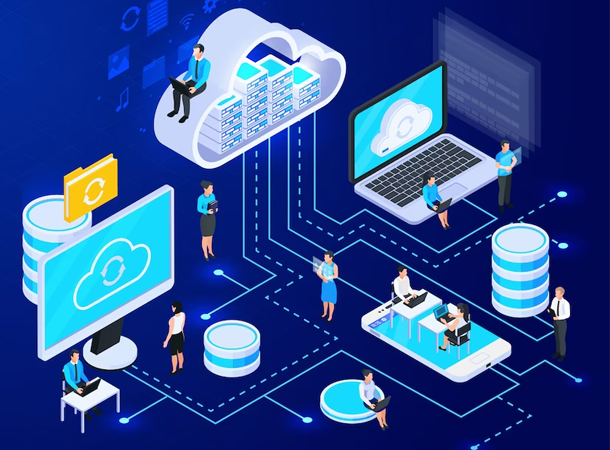
    Cloud computing refers to the use and delivery of computing resources over the internet. Computing resources include servers, applications, databases, networking, and analytics. Instead of dealing with the heavy maintenance costs of on-site servers, businesses enjoy the same service, and even more, while paying only for the resources and services they use with cloud computing.

    As a result, they can cut operating costs while solving the challenges of local storage without worrying about security and privacy issues. Interestingly, cloud computing services are available to all kinds of companies and organizations, whether small, medium, or large scale.

    Types of Cloud Computing

    Cloud computing refers to the use and delivery of computing resources over the internet. Computing resources include servers, applications, databases, networking, and analytics. Instead of dealing with the heavy maintenance costs of on-site servers, businesses enjoy the same service, and even more, while paying only for the resources and services they use with cloud computing.

    As a result, they can cut operating costs while solving the challenges of local storage without worrying about security and privacy issues. Interestingly, cloud computing services are available to all kinds of companies and organizations, whether small, medium, or large scale.

    Types of Cloud Computing

    Generally, there are four types of cloud computing models, which are:

    • private clouds
    • public clouds
    • hybrid clouds
    • multiclouds

    Private clouds

    Private clouds are clouds owned by a single end-user, group, or company and run behind the owner’s firewall. In private clouds, the entire IT infrastructure is dedicated to just one user who enjoys exclusive access. Private clouds are typically only available for internal use as they’re developed within the organization or company.

      Public clouds

      Public clouds are cloud resources offered by large cloud providers for public use. Public clouds aren’t owned by the users and can have millions of users, with each having its own privacy. Popular examples of public cloud providers are Alibaba Cloud, Google Cloud, IBM Cloud, Amazon Web Services (AWS), and Microsoft Azure.

        Hybrid clouds

        Hybrid clouds are formed from a combination of at least one private and public cloud connected via local area networks (LANs), wide area networks (WANs), virtual private networks (VPNs), and/or APIs.

        Multiclouds

        Multiclouds are the result of combining multiple public cloud resources from multiple vendors, and they can sometimes include private cloud resources too.

        Cloud services

        It’s worth mentioning that cloud computing models are different from cloud computing services. Cloud services indicate software or infrastructure hosted by third-party cloud providers for users via the internet. There are several types of cloud services, but the three main ones are IaaS, PaaS, and SaaS.

        Cloud Computing Features & Benefits

        1. Near-limitless scalability.

        Business demands often increase with time, and as more products, services, or operation models are introduced. Unlike traditional methods, cloud computing enables businesses to easily scale their IT solution while keeping costs friendly. Thus, using cloud computing solutions gives companies the confidence to scale their business without worrying about overburdening their IT infrastructure.

        2. Innovation

        Traditional storage systems often have back-end performance issues which can be a major setback for organizations looking to be innovative. With cloud computing, innovation is an added advantage as the infrastructure allows businesses to experiment with different solutions and determine the most suitable and cost-effective one.

        3. Cost-Effective

        Cloud computing offers way cheaper and more reliable IT solutions, from the set-up cost to the maintenance fee. Although migrating to the cloud can be a bit expensive, it’s still a better alternative when businesses consider the cost of maintaining local storage methods.

        4. Improved availability

        Cloud computing eliminates the challenges of unavailability of files since it only requires a dependable internet to connect to your business data. All relevant team members can access and share important files while being far apart, making it easy to collaborate with the right people and break the distance barrier.

        5. Pay for use

        There are lots of free features on cloud services that small and medium businesses can take advantage of. However, there are also packages that companies have to pay for to enjoy the full potential of the cloud.

        That said, the pricing model for cloud service users is solely dependent on usage rather than having a fixed fee. This is a cheaper and more economical model as businesses wouldn’t have to pay for services they didn’t use. Thus, cloud computing encourages the maximum use of resources while generating greater ROI.

        Conclusion

          Cloud computing is penetrating more businesses as news about its effectiveness and affordability continues to spread from one industry to another. Its benefits, as compared to traditional methods of handling IT needs, are incomparable. Plus, cloud computing offers businesses more robust security while keeping costs significantly lower and providing broader network access.

          Written by – Mr. Adam Pittman

        • Trusted online Remote Computer Repair in NC

          Trusted online Remote Computer Repair in NC

          Every computer experiences a problem at some point, whether it’s a virus infection, snail-like booting, or other kinds of problems. Traditionally, most people will immediately reach out to a local computer repairer to diagnose and troubleshoot their device.

          However, with technology becoming more advanced by the day, there’s now a better, cheaper, and faster way to tackle computer problems via online remote computer repair. If you’ve heard this before, it may sound far-fetched, but it’s not.

          A lot of software-related computer problems can now be solved remotely, saving you time, money, and stress. How does this work, and how do you get a trusted remote computer repair service? Read on to find out.

          What is a Remote computer/laptop repair service?

          Remote computer/laptop repair service is about diagnosing and fixing computer issues over the internet. The tech support personnel uses remote access software to fix your computer after you’ve given them permission.

          No need to worry about taking your computer down the neighborhood amid a tight schedule as you can now have it fixed over the internet.

          Whether it’s your printer that fails to perform as designed or your computer’s performance has become slower, remote computer repair can look into the problem and solve it while your computer stays in your home.

          Why use Remote computer/laptop repair services?

          Remote laptop repair service offers users a lot of benefits, some of them are:

          1. It saves cost

          Imagine how much you’d spend if you had to take your laptop or desktop down to an engineer every time it develops a technical problem. With remote computer repair services, you can solve all your computer’s issues without stepping outside your home.

            2. It saves time

            We’re in a busy world today, and everyone is looking for faster solutions to problems to help them get more free time on their schedule. Rather than putting off repairing your computer till the weekend when you should be relaxing, you can get it up and running by using remote computer repair services. As a result, you can save more time and attend to other important activities on your to-do list.

              3. It increases your computer’s availability

              Imagine you have to complete an urgent task, but your computer suddenly develops a fault and doesn’t seem to respond. Instead of wasting more time scheduling an appointment with a repairer and hoping they’d figure out the problem on time, you can solve the problem at once using a remote computer repairer. Thus, your computer will be more available for use, especially in times of emergency.

              4. It eliminates stress

              A process that customarily requires taking your machine to a local repair shop has now been simplified so that you can get the same service and even better without stepping out of your home. Remote computer repair services eliminate the stress of taking your computer to repair, helping you use your time and energy for more important tasks.

              How does online computer repair works?

              The backbone of online computer repair is a strong internet connection. You must have a reliable internet connection to take advantage of remote tech support.

              Online computer repair works by giving a remote technician access to your computer via pre-installed software, which enables them to diagnose your device. Once you turn on your computer and grant them permission to control your computer, they’d diagnose and troubleshoot it, restoring optimal performance and reliability.

              Types of Online Computer Repair

              Computer Optimization

              Computers tend to run slower as you install more software over time due to the accumulation of junk programs. To get your machine optimized and running fast again, you must eliminate these junk programs and clean out unneeded files located on your hard drive. A reliable online computer technician can help remove junk files remotely and return your computer to its initial flash-speed performance.

              Printer Issues

              The devices you attach to your computer can also develop a technical issue, thereby failing to function well. Instead of wasting time doing guesswork, you can get to the source of the problem at restore normalcy using a remote computer repair service.

              Remote Virus Removal

              Computer viruses are evolving and becoming more stubborn for antivirus programs to handle. PC owners often need to go to an engineer to help remove viruses from their machines to enjoy smooth functionality. Well, not anymore. With remote computer repair handled by experts, you can now get rid of viruses from your computer without leaving your comfort zone.

              How To Get a Trusted Remote Computer Repair Service

              Because your remote computer repair service provider will be gaining access to your machine, it’s important to ensure they are trusted to avoid future security issues. To get a trusted computer repair service, look up the company’s reputation online and see how trustworthy they are.

              You can as well visit their social media pages and other relevant areas to see their performance, such as Facebook and Google business pages. Look at the tools they want you to install and read reviews about them to ensure they are safe. If the company doesn’t have a social media page or strong online presence, they’re probably not a trustworthy technician.

              Conclusion

                Remote computer repair services are far more effective ways to tackle software-related issues that computers and peripheral devices like printers, cameras, USB devices, and others experience. Reach out to a reliable online computer repair service provider to save time and money while eliminating stress when fixing computer issues. Call us @919-276-0282 or contact us by mailing to sales@computerbilities.com.

                Written by – Mr. Adam Pittman

              • Enterprise data backup and disaster recovery solutions.

                Enterprise data backup and disaster recovery solutions.

                In today’s IT-driven world, data is one of the most important assets of any enterprise. From understanding customer needs to determining how to optimize operations for maximum profitability, data plays a significant role in driving the success of any business.

                As technology advances, cyberattacks continue to evolve and threaten data privacy, putting more businesses at risk globally. These cyberattacks affect the reputation of businesses and inflict monetary damages. Besides cyberattacks, there are several scenarios that can cause data loss in an enterprise, such as accidental deletions, storage failures, and system outages.

                Businesses must put in place an effective risk management strategy that enables them to back up data and recover from disasters such as cyberattacks, natural disasters, accidental deletions, system outages, and other scenarios that lead to data destruction. Hence the need for enterprise data backup and disaster recovery solutions.

                What are Enterprise Data Backup Solutions?

                Enterprise data backup refers to the transfer of business data from a primary storage location to a secondary storage location so as to ensure that it can be easily recovered in the event of a data loss or exfiltration.

                Data backup solutions refer to the software or hardware tools that data can be stored on to protect and secure it against any destructive event.

                What is Enterprise Disaster Recovery Solution?

                Enterprise disaster recovery refers to the process of maintaining business continuity amid disaster or interruption in operation. Enterprise disaster recovery solutions are those tools (software and hardware) and policies that enable businesses to recover quickly from a disaster or interruption and continue to operate normally.

                Disaster recovery solutions help enterprises restore data and business operations when a disaster occurs, such as a software or hardware failure, accidental data loss, natural disaster, or ransomware attack.

                Why Data Backup and Disaster Recovery are Important for Businesses?

                Businesses today rely heavily on data for the successful execution of their daily operations. This data can be in documents, files, folders, and servers and can be lost or manipulated in the event of a disaster.

                Data backup and disaster recovery help businesses in many ways when an unexpected situation that can potentially disrupt or destroy operations occurs.

                1. Prevents financial loss

                When business operations stop due to a disaster, companies lose money and possibly face financial penalties. Also, customers may turn to their competitors and continue to transact with them, leading to the compromise of business relationships.

                Data backup and disaster recovery solutions ensure that business continues to function even amid tough times, thus preventing financial loss.

                  2. Protects reputation

                  Enterprises that cease to function due to a disaster are often seen as unreliable. As a result, partners, investors, and customers may feel reluctant to do business with them due to their stained reputation. Data backup and disaster recovery ensure that business reputation is preserved, regardless of the circumstances.

                    3. Improves security

                    Ransomware, malware, and other security risks can be greatly reduced with an effective backup and recovery process. So even if cybercriminals steal vital information from a company’s database or erase them, they can be easily recovered to continue business operations.

                    The Challenges of Data Backup & Disaster Recovery

                    When enterprises design data backup and disaster recovery plans, they experience a few challenges, which are:

                    1. Ensuring reliably scheduled backups

                    What is the ideal backup frequency? Do backups occur as scheduled? Businesses must ensure their data backup services are reliable and that they occur at the right times.

                    2. Preventing missing and corrupted data

                    Sometimes files become corrupted, and critical data get missing after a backup. Organizations must verify that backups are done successfully and that files aren’t corrupted or missing in the process.

                    3. Aligning data backup needs with application architecture requirements

                    There are different ways of backing up data and choosing the right one can be challenging, especially when there are many factors to consider. The ideal backup architecture will offer the best protection against data loss or file corruption, thus putting one’s mind at rest.

                    4. Accurately prioritizing data

                    Not all data on the server have equal priority. Crucial data must be backed up first before less important ones to ensure the best result. Also, frequently changing data should be backed up more regularly than those that remain the same for a long time.

                    What does 3-2-1 means for Backup and Recovery Planning?

                    3-2-1 in backup and recovery planning refers to a backup practice where businesses have three copies of their data. Two copies are stored locally and on different storage media, while one copy is stored off-site. This technique offers the best protection against an unexpected disaster that leads to data loss or manipulation.

                    Often, the off-site copy is stored in the cloud for maximum protection, while the on-site storage is done on two separate media; primary and secondary media.

                    Keys To Success in an Enterprise Backup Strategy

                      To develop a successful enterprise backup strategy, the following must be considered:

                      1. Ability to efficiently back up data within a specific operating window.

                      2. Ability to recover data quickly since this helps to minimize downtime after a disaster

                      3. Reliability and scalability so that expanding business needs are met easily

                      4. Affordability

                      Conclusion

                      Every enterprise must have an effective data backup and disaster recovery solution to ensure continuous operation regardless of the challenges. Such legacy helps to build a strong reputation and wins new businesses, thus increasing profitability and reducing financial losses.

                      Written by – Mr. Adam Pittman

                    • Basic Of Network monitoring

                      Basic Of Network monitoring

                      Every IT infrastructure comprises software and hardware components that work hand in hand to form a network that delivers a desired service. To ensure the infrastructure’s performance is optimized at all times, this network must be monitored proactively.

                      Potential network issues must be detected and fixed ahead of time to avoid data sharing failure or other network-related issues, hence the need for network monitoring services.

                      What is Network Monitoring?

                      Network monitoring refers to the process of monitoring all the components of a computer network to ensure optimal performance and availability. Typical examples of network components are routers, switches, servers, modems, bridges, firewalls, and VMs.

                      Network monitoring services are services geared towards network monitoring so that computer network problems are avoided, and performance is optimized. It typically requires using hardware and software monitoring systems to track network operations, such as traffic and bandwidth utilization.

                      Network Monitoring Services Benefits

                      Network monitoring services offer tremendous benefits for computer networks, such as:

                      Clear visibility into the network

                      Network administrators allow organizations to clearly see all the devices connected in their network and the traffic traveling through them. This helps to ensure that each device is used within its limits to avoid device or system breakdown, which may result in extra costs of repair.

                        Increasing Complexity

                        From communication to data sharing, businesses today have become largely dependent on the internet. Certain services like SaaS, ISPs, CDNs, UCaaS, VPNs and many upcoming ones depend primarily on the internet, thus increasing network complexity.

                        Increased network complexity makes the IT infrastructure prone to poor performance. However, with network performance monitoring, each component will be adequately monitored and optimized so that the entire system performs.

                          Better Use of IT Resources

                          Building a highly productive enterprise requires maximum use of all resources, including IT resources. Proper network management allows businesses to derive more benefits from IT and reduce manual work where necessary, helping employees focus more and perform better.

                          Early Insight into Future Infrastructure Needs

                          Using data gathered from network components’ performances from the past and present, administrators can predict future infrastructure needs and fulfill them. Network monitoring solutions can as well be provided for possible future network challenges based on deductions from the analyzed performance data.

                          Ability To Identify Security Threats Faster

                          Any threat to the network is a threat to the entire IT infrastructure because the network is the lifeline of every IT infrastructure. Proper monitoring helps to identify security threats earlier so that enterprises can take timely action to halt the attacks and prevent the loss of sensitive data.

                          Protocols for Network Monitoring

                          SNMP

                          The Simple Network Management Protocol (SNMP) is an application-layer protocol that’s widely used for maintaining network elements by monitoring system status and configuration. It deploys a call-and-response system to exchange and extract management data which is then used to determine the status of devices, such as modems, printers, switches, etc.

                          ICMP

                          Internet Control Message Protocol (ICMP) focuses on error reporting when devices fail to transfer data successfully. Routers, servers, and several other network devices rely on this protocol to report errors and device failures.

                          Cisco Discovery Protocols

                          The Cisco Discovery Protocol works specifically for Cisco devices and is a Layer 2 proprietary protocol. Cisco devices (including switches, routers, and modems) have Cisco default-enabled on them and operate on LAW and WAN media, thus making them easily manageable with this protocol. Network monitors use Cisco to discover Cisco devices and monitor their efficiency in the network.

                          ThousandEyes Synthet ICS

                          ThousandEyes Synthetics refers to an internet-aware synthetic monitoring that mirrors the path users take when interacting with a network component such as an application. This enables the proactive detection of potential network issues and the provision of solutions to counter them.

                          How To Perform Network Monitoring Effectively?

                          Effective network monitoring involves cutting off redundant loads and tasks so that the system focuses on delivering quality services. It helps to ensure that an organization’s IT infrastructure performs well so that users can comfortably rely on the system.

                          To perform network monitoring effectively, one must:

                          Monitor only the essentials – not all devices require round-the-clock monitoring. Essentials like servers, routers, and switches should get more attention than less crucial ones like printers.

                          Optimize the monitoring interval – choose the right interval for which each device should be monitored to get the best results.

                          Choose the right protocol – each protocol has its strengths and limitations, but you want to choose a secure and non-bandwidth-consuming network management protocol to avoid interrupting network performance.

                          Set thresholds – this helps you take a proactive approach to network issues so that you won’t have to wait until users report network failure before detecting something wrong.

                          Factors to Consider While Monitoring The Network

                          Flexibility

                          Flexibility in network monitoring enables administrators to visualize important network metrics from any component or device at a glance.

                          High availability

                          The right network monitoring tool for a network should be highly available to report any irregularities or issues. You don’t want to deploy a monitoring tool that will often, as this can leave your network unmonitored for a long time.

                          Scalability

                          As business demands increase, monitoring needs may rise. Your ideal monitoring tool should be scalable so that it extends its scope of monitoring without breaking down.

                          Security

                          Monitoring your network should enforce your cybersecurity and reduce the risks of attacks. You should consider monitoring tools that enhance security and do not create loopholes through which malicious actors can penetrate.

                          Multi-vendor compatibility

                          Network monitoring tools should be compatible with multiple vendors for effective performance as today’s network environment are more hybrid.

                          How To Choose a Network Monitoring Solution?

                          There are different ways of monitoring a network, and choosing the right monitoring solution means a better-performing network and greater ROI for your business.

                          Automated solutions are the best for network monitoring, and they come in different types. To choose the right network monitoring solution, consider the following:

                          • Advanced reporting
                          • In-depth visualization
                          • Automatic device configuration
                          • Performance monitoring
                          • Quicker fault resolution

                          Conclusion

                          With proper network monitoring, your IT infrastructure will deliver seamless service with little to no downtime, helping you build a reputation for reliability and excellent service. By choosing the right tool to monitor your network, you can rest assured that your devices are in safe hands and will deliver optimal performance at all times.

                          Written by – Mr. Adam Pittman

                        • The Carying Place – Support Local Families In the NC Triangle This Season

                          The Carying Place – Support Local Families In the NC Triangle This Season

                          The Carying Place is a non-profit organization that focuses on providing charity for homeless persons and supporting individuals and families in the NC Triangle. Besides providing material support, they empower homeless families with life skills and financial literacy that help them improve their financial situation and provide for themselves, thus living independently.

                          What Exactly Does “The Carying Place” Do?

                          Charity for the homeless

                          The Carying Place provide charity for homeless, working families with children in the NC Triangle, which entails:

                          • A furnished temporary apartment
                          • Rent and utilities
                          • Support partners who enlighten families on basic skills such as balancing a checkbook, creating and following a budget, starting a savings program, etc.
                          • Children’s program to determine and cater to the needs of each child

                          Supporting individuals and families

                          The Carying Place supports motivated individuals and families by providing opportunities for personal growth and development within a 16-week period. Individuals and families will acquire skills that will improve their chances of getting better employment opportunities and raise their standard of living.

                          Endowment

                          Their endowment program helps us raise funds for all our expenses and support services, such as temporary housing, utility bills, events, and training, etc. With the endowment program, they can preserve important assets, gradually increase the number of families we help, and continue to impact lives positively. Kindly click here to donate to our program.

                          Events & Empower

                          They feature a series of events designed to empower homeless families and elevate their financial situation within a short period. These programs help individuals and families learn important skills that make them become self-sufficient in life.

                          “The Carying Place” – Mission, Impact, and Outcome

                          Mission

                          The mission is to help homeless, working families with children live a beautiful life again by equipping them with important life skills and financial literacy within a short period. By providing temporary accommodation for each family and catering to their basic needs for the period they are enrolled in the program.

                          Impact

                          They have impacted more than 500 families and taken them from homelessness to self-sufficiency across our 29 years of existence. Teaching life skills at our regular meetings and events and enhanced their financial literacy, thus making them capable of running and maintaining a good life.

                          Outcome

                          The Carying Place has an impressive 80% success rate, saved an average of $3-5k, and helped over 500 families, including 860+ children. Our charity organization has supported individuals and families interested in becoming self-sufficient and elevating their standard of living through impacting beneficial knowledge.

                          Help Our Homeless Working Families With Children

                          From voluntary participation to financial donations, we need every support we can get to help homeless, working families live a normal life again. You can donate to this praiseworthy course by clicking here.

                          Awards, Recognition & Memberships

                          Awards, recognition, and memberships include:

                          • Charitable Partner Award – The Cary Chamber of Commerce – 2009, 2013 , 2018 & 2022 
                          • Participation in Business Networking International – Profits in the Park Chapter
                          • Member of Morrisville Chamber of Commerce
                          • Participation in Women In Networking – Cary Chapter
                          • National Association of Nonprofit Organizations and Executives (NANOE)

                          Conclusion

                          Computerbilities is a proud supporter of Carying Place, a Cary, North Carolina-based charity organization supporting homeless individuals and families in the North Carolina Triangle area. We are delighted about all the good work they have done over the years and look forward to seeing more exceptional charity work.

                          Want to help us impact more lives? Your donation will be highly appreciated. Kindly click here to donate now.

                        • 3 of the Best Communication Tools For Construction Companies

                          3 of the Best Communication Tools For Construction Companies

                          Clear and effective communication is critical to any construction project, as it enables every aspect of the project to be executed as designed. Construction companies must incorporate IT Support to enhance communication before and during project execution to minimize misunderstandings, leading to delays. IT Support for construction companies comes in different ways, one of which is through the provision of tools that ensure clear communication at every level.

                          Why do Construction Companies need communication tools?

                          IT Services are impacting the construction industry and enhancing productivity exponentially. However, construction companies need Managed IT Services to prevent system and network downtime and provide a timely solution to unavoidable IT-related challenges, thus enabling the construction team to focus on project operations.

                          Some core benefits of communication tools for construction companies include:

                          • Improving teamwork
                          • Guarantees timely project completion
                          • Minimizes the wastage of resources
                          • Ensures job satisfaction
                          • Boosts productivity and engagement

                          Actual Communicating Tools A Construction Company Require

                          1. Microsoft Teams

                          Microsoft share point and office 365 are two highly essential software from the Microsoft collection which help construction workers to:

                          • chat
                          • share files from anywhere
                          • manage documents
                          • assign tasks,
                          • and implement QHSE (Quality Health Safety & Environment) guidelines to ensure workers’ safety in the field.

                          2. Slack

                          The second communication tool construction companies should have in their arsenal is Slack, an essential tool for effective teamwork. Slack helps contractors and workers stay in sync regardless of their distance apart and keeps information clear so that no detail is left out. From file sharing to project monitoring, Slack is an indispensable tool for seamless team collaboration and ensuring the success of any construction project.

                          3. 3CX- VOIP phone system

                          The third essential communication tool for construction companies is 3CX, a simple yet powerful communication system packed with tons of helpful features. 3CX is a VOIP phone service that allows you to integrate different mobile and computer devices, thus enabling free calls, web conferencing, viewing workers’ reports, and many more.

                          Beyond the construction industry, 3CX VOIP phone service can also help small and medium businesses significantly cut communication costs by over 80% with its free inter-office and branch calls feature. Regardless of the device, 3CX can easily connect to regular phones, desk phones, cell phones, computers, and laptops, which is why it’s an indispensable communication tool that saves costs and boosts productivity across various industries.

                          Conclusion

                          Communication is the backbone of every construction project, and it determines the quality of its outcome. With effective communication, every team member understands their roles and has the same endpoint in mind, thus helping the project progress much faster. By incorporating the right communication tools in your company, team collaboration will be a breeze, and every member will be on the same page at all times.

                        • 3 Red Flags of Facebook Marketplace That Are Sure Signs of a Zelle Scam

                          3 Red Flags of Facebook Marketplace That Are Sure Signs of a Zelle Scam

                          Cash is out, and digital currency is in

                          Transferring money digitally is now the normal thing to do. Venmo, Zelle, Cashapp, and Paypal are a few of the most popular ways that make sending money fast, effortless, and accessible.

                          Our most popular blog post ever shared a common PayPal scam and warned about 3 things to watch out for before you purchase or sell online! Now we will talk about selling online and the new Zelle scam that’s been tricking consumers right and left.

                          Facebook has made its Marketplace convenient, easy, and safe! You can sell used items and services at the touch of a button without the hassle of setting up your own website or eCommerce platform. Facebook Marketplace has many advantages, but just like anything good in life, there are also disadvantages. Scams are a major one!

                          Don’t- Sell Online If They Do One of the following three things because it’s a surefire sign that a potential buyer is trying to scam you.

                          1. They want to avoid paying through Facebook and ask for personal information such as routing number, account number or address.  
                          2. They are too eager to buy, don’t try to negotiate the price, and/or they will not be picking up the items themselves.
                          3. You look at their Facebook profile, and they are nowhere near your location; they use bad grammar, or if they start calling you Facebook (yes, that happens)!

                          Real Life Breakdown of a Zelle Facebook Marketplace Scam

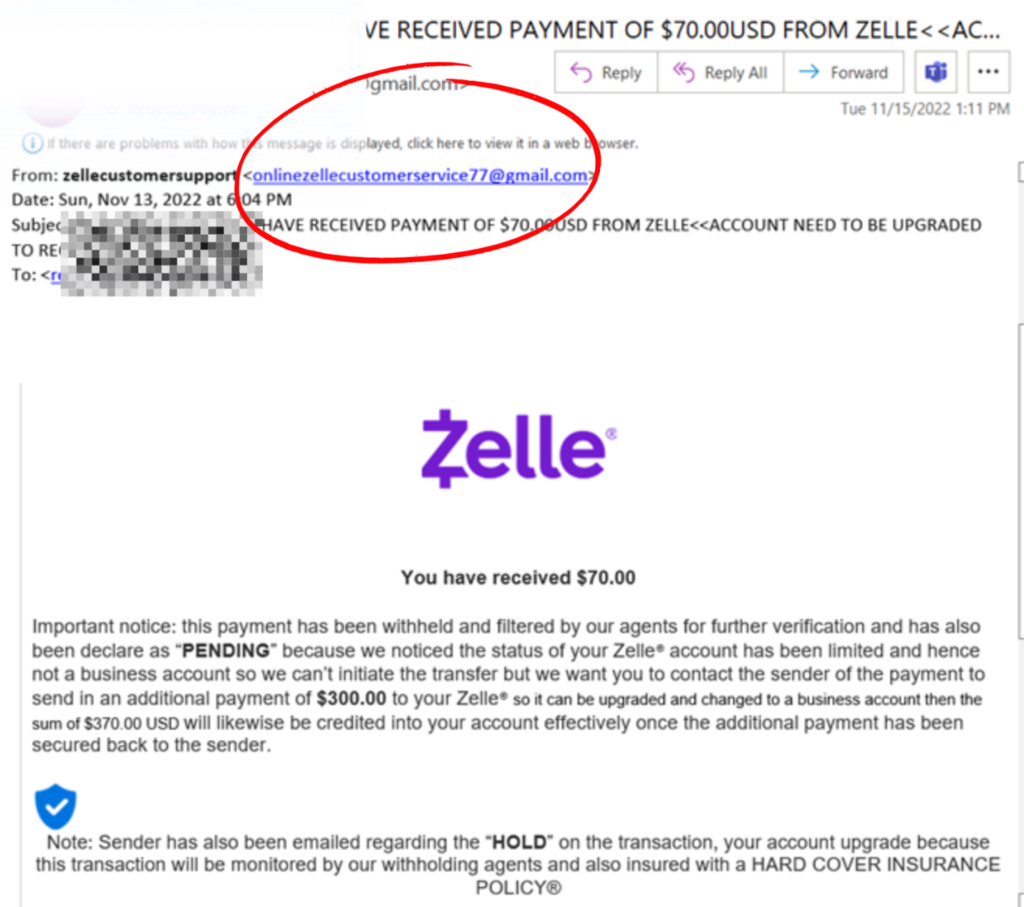
                          This screenshot shows the breakdown of a real email of this common scam utilizing the platform scam Zelle. There’s a few obvious red flags!

                          • The buyer agreed to pay $70.00 for no negotiation.

                          The buyer wanted to buy it but said her brother would pick it up and ship it there, but the item was rather large. 

                          The seller received this email after giving the scammer their email information. If you notice, the From email address is from a Gmail account, and the text size is inconsistent, which is pretty obvious.

                          They are asking the seller to send an additional $300 for the funds to be “released” and changed to a business account. Thankfully the seller knew the warning signs and immediately reported them and blocked the buyer on Facebook Marketplace.

                          The scammers may have stollen this email template from a real email that  Zelle uses, making it very likely that a consumer could easily fall victim to this scam. Scammers are experts at tricking people, so always check the three warning signs listed mentioned in this article before selling anything online.

                          Have You Been Compromised, or have any questions about Facebook Marketplace scams? Contact Computerbilities For A Free, No Obligation Dark Web Scan!

                          https://www.computerbilities.com/dark-web-scan

                        • What is IT Support? Definition and Functions

                          What is IT Support? Definition and Functions

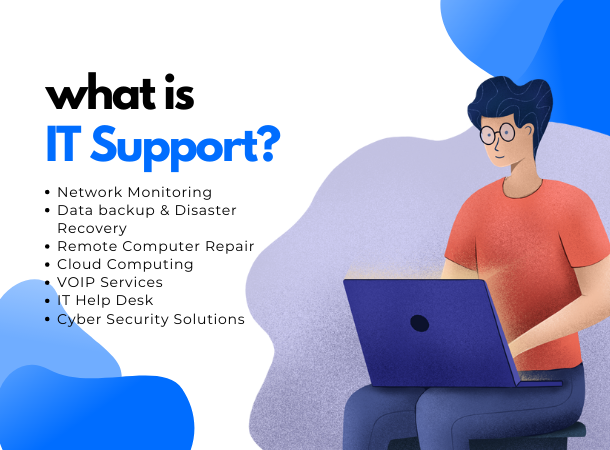
                          What is IT Support?

                          Introduction

                          Welcome to the 21st century, the age of information and technology (IT). Every business, whether small or large, depends on IT to meet modern age demands and thrive. From business operations to employee management, IT impacts a wide range of sections, allowing each department to function efficiently.

                          Effective IT can automate specific business tasks, thereby eliminating redundancy and improving the quality of goods or services, which leads to greater customer satisfaction. Computers, networks, printers, and other IT-related devices provide seamless communication between employees and increase workflow considerably.

                          But what happens when your IT system fails to perform due to a technical issue? Business operations halt, communication is jeopardized, and productivity dwindles; and that’s exactly why IT Support is crucial.

                          IT Support

                          When your business experiences technological issues, you need dependable Tech support to restore normalcy as quickly as possible. IT Support is a comprehensive term covering any technology-related assistance provided for individuals or businesses. IT Services brings timely solutions to issues affecting your computers, printers, networks, and other parts of your IT system.

                          What does IT Support Do?

                          IT Support is responsible for solving all software and hardware problems and answering questions surrounding the use of IT devices and networks. IT Support helps businesses to set up, install, configure, and maintain IT Systems and network equipment such as computer hardware and software, routers, switches, printers, scanners, etc.

                          Not only that, but IT Support also regularly performs maintenance upgrades on the current system to ensure optimal system and network performance, resulting in greater business productivity. Additionally, IT Support protects businesses from cyberattacks, protects valuable digital assets, and educates employees on how to use IT to boost performance. What do IT Support technicians do?

                          IT Support Technicians are responsible for setting up, installing, configuring, and maintaining IT Systems and networks. They provide timely and effective solutions to all tech issues that arise in order to keep businesses running smoothly and efficiently. IT Support Technicians may also guide employees and customers on using business-specific software programs to accomplish specific tasks.

                          The role of a technician includes answering phone calls, questions, and live chats relating to technical difficulties so as to swiftly fix any IT-related issues such as poor or nonexistent networks, computers running slowly, data loss, etc. Other responsibilities of IT Support Technicians include:

                          • Planning and carrying out maintenance upgrades from time to time
                          • Repairing IT devices (e.g., computers) and replacing parts
                          • Investigating and troubleshooting software issues
                          • Responding to system breakdown
                          • Etc.

                          Depending on the complexity of the technological issue, Technical Support can be categorized into Level 1 and Level 2.

                          Level-1 Technical Support

                          Level-1 Technical Support refers to any basic support that can be provided by IT personnel with average understanding and experience of technical issues i.e. junior-level technical support personnel. Level-1 Technicians usually have limited access to company data and will direct any complex technological issue to Level-2 Technicians.

                          The responsibilities of Technicians in Level-1 include:

                          • Collection of customer queries, requests, and data
                          • Attending to customers via phone calls
                          • Responding to social media chats and user emails
                          • Solving common issues such as menu navigation, setup and installation errors, username and password errors, and verification of hardware and software.
                          • Conducting basic troubleshooting
                          • Creating tickets for Technicians in Level-2 Support
                          Level-2 Technical Support

                          Level-2 Technical Support Technicians provide solutions to advance technical issues that the Level-1 support team can’t handle. They receive the tickets created by junior technicians, review them to understand how much Tech support has been provided so far and determine the right course of action to solve the issue.

                          Level-2 Technicians may communicate with users for an in-depth understanding of the problem before proceeding with troubleshooting. These technicians have deeper knowledge and experience in solving tech-related problems and are also equipped with a solid understanding of the company products.

                          Essential & Key Benefits of IT Support For Businesses (100 words)

                          IT Support offers tons of benefits for businesses and allows operations to carry on smoothly with little to zero interruptions. With reliable IT Support, productivity across various departments skyrockets, and communication with different teams occurs seamlessly. As a result, businesses can optimize their employees’ abilities and easily upgrade their skillset through virtual training whenever they need to adjust operational practices. Some of the core advantages of IT Support for businesses include:

                          IT-support advantages include the following:

                          Increase ROI & Reduced Spend

                          Businesses can cut costs and increase workflow by automating specific tasks using an efficient IT System. Investing in IT Support greatly reduces downtime and boosts customers’ trust and loyalty. Due to this, businesses record more patronage and generate greater revenue, thus increasing their Return On Investment (ROI).

                          Increase Innovation & Speed

                          It’s not sufficient to merely have IT Systems; you need to regularly optimize their performance and integrate innovative ideas that help your business meet up with our fast-paced world. Professional IT Support will help to enhance innovation in your company and keep your moving ahead of time.

                          Enhanced Cybersecurity

                          With cyberattacks increasing and evolving by the hour across various industries, having dependable Tech Support is essential to keep your Cybersecurity at peak level. A single successful cyberattack can lead to the loss of valuable data and disruption in operations, causing financial loss. Computabilities puts you on top of your Cybersecurity game and keep your business well secured.

                          Delighted Employees

                          Employees perform better when they have the right resources and backup. When there’s an issue with the computer systems or networks, employees know what to do to resolve the issue and restore normalcy. Undoubtedly, this brings delight to their hearts, reduces downtime, and enhances productivity.

                          Better IT Adaptable

                          Technology moves at a very fast pace, and businesses that want to remain relevant and competitive must adapt to new developments. Reliable IT Support can help your business stay up to date with technological tools and techniques and make the most of them for profitability.

                          Effortless Scaling

                          As your business grows, certain tasks become more tedious and time-consuming. However, with dependable IT Support, you can quickly scale operations to accommodate business growth. Automate and assign tasks with ease and get quick yet high-quality results from your employees and tech investment.

                          Less Time Worrying & More Time Managing

                          An issue as simple as poor network connection can significantly impact your employees’ performance and cause dissatisfaction, especially when there’s no dependable IT Support. They’d have to worry about figuring out the solution, and that dwindles their productivity. With reliable IT Support in place, everyone spends less time worrying and more time managing their roles.

                          Maximized Company Efficiency & Productivity

                          Why are more companies incorporating IT into their operations in this age? It’s simple; IT increases business efficiency and productivity. And with advancements in AI(Artificial Intelligence), you can easily teach the computer to handle certain tasks and supplement your staff in others, thus reducing stress on employees and boosting the quality of products and services.

                          Customized Services

                          Every business is unique, even when they sell the same products or serve the same market. Your operation policies and procedures may bring about unique IT issues that require tailored solutions for optimal results. IT Support can provide customized IT services that effectively address your technological issues and meets your business needs.

                          Where Does IT Support Fit On Your Team?

                          Gone are the days when IT departments used to be separated from other teams and kept hidden away in the basement. Today, with more operations relying on IT for efficiency, businesses have begun to realize that IT departments are indispensable tools for the progress and success of other departments. As a result, organizations have started to integrate IT departments into their core organizational structure fully. In fact, successful businesses with multiple teams now provide IT Support for the teams separately since each department’s systems, databases, and tools vary. Doing this has greatly enhanced the productivity of each department, minimized downtime, and increased profitability significantly.

                          Tools For IT Support

                          [elementor-template id=”36166″]

                          Conclusion

                          Getting IT Support for your business will enable you to enhance productivity, cut costs, and deliver quality to your customers. If you’re looking for a dependable, experienced, and dedicated IT Support team for your company, Computabilities is the name to trust. Reach out to us on 919-276-0282 or email at sales@computerbilities.com to get top-tier Tech Support today.

                          Written By – Adam Pittman

                        • What is NIST 800-171 and how to stay compliant in 2023

                          What is NIST 800-171 and how to stay compliant in 2023

                          Introduction

                          The US government requires any third parties, partners, and contractors that process, store, or transmit sensitive, unclassified government information on its behalf to be compliant with the National Institute of Standards and Technology Special Publication 800-171 (NIST SP 800-171) cybersecurity standards. Examples of organizations that fall under this category are consultants, manufacturers, contractors for the Department of Defence, research institutions that get federal grants, universities, and service providers for government agencies.

                          NIST 800-171 standards are designed to protect sensitive information located on the IT systems and networks of federal contractors from unauthorized access. The standards were published in June 2015 by the National Institute of Standards and Technology (NIST) and have been updated over the years to tackle emerging cyber threats and ensure optimal protection and security of sensitive government information.

                          What is NIST 800-171

                          NIST 800-171 is a publication of the National Institute of Standards and Technology (NIST) that entails all the security practices and standards that are required of any organization that processes, stores, or transmits sensitive, unclassified information on the US government’s behalf.

                          Specifically, NIST 800-171 focuses on the protection of Controlled Unclassified Information (CUI) and works to safeguard confidential government information from getting into the wrong hands. Examples of this controlled, unclassified information include personal data, intellectual property, logistical plans, equipment specifications, and so on.

                          What is the Purpose of NIST 800-171

                          NIST 800-171 helps to define the practices of specific areas of cybersecurity controls that government contractors and subcontractors must adhere to when their networks handle CUI. The purpose of these standards is to ensure that no organization dealing with sensitive, unclassified government information sets vulnerable cybersecurity practices and procedures that may lead to a privacy breach.

                          By complying with the NIST 800-171 standards, government contractors and subcontractors will boost the resilience of the federal supply chain and safeguard Controlled Unclassified Information in the cyber space from cyberattacks.

                          What is Controlled Unclassified Information (CUI)?

                          Controlled Unclassified Information (CUI) refers to any sensitive information owned or created by the government but not classified. Such information should be safeguarded and disseminated with controls consistent with Government-wide policies because a breach of the data can potentially disrupt national security and cause economic disasters.

                          Examples of CUI are:

                          • Personally Identifiable Information (PII) – such as social security number (SSN), passport number, taxpayer identification number, driver’s license number, etc.
                          • Proprietary Business Information (PBI) – such as data about inventions, patent applications, prototypes or devices, intellectual property holdings or strategy, etc
                          • Unclassified Controlled Technical Information (UCTI)
                          • Sensitive but Unclassified (SBU)
                          • For Official Use Only (FOUO)
                          • Law Enforcement Sensitive (LES), and others.

                          What are the NIST 800-171 requirements used for CUI?

                          In total, the NIST 800-171 requirements used for CUI are 110 in number, and each of them tackles separate areas of an organization’s IT practices and procedures. These requirements cover areas such as access control, authentication procedures, and systems configuration. The requirements set the standards for cybersecurity procedures and as well incident response plans which help to effectively address network security incidents.

                          Each of the NIST 800-171 requirement work to strengthen different elements of the cyber network and collectively create a formidable defence against cybercriminals from accessing sensitive government information. They mitigate vulnerabilities and ensure that the organization’s staff, network, and systems are well prepared to adequately protect CUI.

                          14 Requirements Families of NIST 800-171

                          All the 110 NIST 800-171 security requirements are broadly divided into 14 families, with each family addressing specific cybersecurity topics and their practices. These 14 families work hand-in-hand to ensure the building of a resilient security system that protects CUI. The sectionalization of these requirements makes it easy for organizations to employ them and regularly assess their systems and networks for compliance.

                          The 14 requirement families of NIST 800-171 are:

                          1. Access Control

                          Access control requirements tackle access to networks, systems, and information. Under this family, there are 22 different requirements designed to help determine who has access to sensitive data and to keep unauthorized users restricted from the data. Also, access control requirements regulate the flow of sensitive information and protect it within the network, guiding network devices in the system.

                          2. Awareness and Training

                          The Awareness and Training family is governed by three requirements. Without proper awareness and training of the personnel in charge of the system, the cybersecurity system remains vulnerable, even if it’s built on the most robust technology. Awareness and Training requirements make managers, admins, and all others involved in the organization understand their duties towards preventing cyber threats and the risks related to these threats. Each individual understands what to do if there’s a data breach attempt and how to keep security at the top level.

                          3. Audit and Accountability

                          Nine requirements make up the Audit and Accountability family, which centres around auditing and reviewing the system and logged events. Routine auditing and accountability help to protect the system as it ensures that only the best policies and procedures are used at all times. This section also uncovers and mitigates potential cybersecurity incidents, keeping CUI out of the wrong hands.

                          4. Configuration Management

                          It’s essential to configure all the software, hardware, and devices on the organization’s network to meet the security requirements. Configuration management has nine requirements that help organizations ensure they are well configured to execute blacklisting, whitelisting, and the prevention of unauthorized installations and download of nonessential programs. This prevents any part of the system from being compromised or bringing in malicious software that can spy on the networks and systems.

                          5. Identification and Authentication

                          At any point, organizations handling CUI can determine the person using their devices and verify their identity before they gain total access to the system. There are 11 requirements in this family that ensure that every user gets authorized before accessing the system, and they also determine how much the person can access. The requirements encompass password and authentication procedures and policy, together with accurate identification of users.

                          6. Incident Response

                          Cyberattacks continuously evolve, and without adequate incident response, they may end up penetrating the system. There are three requirements that tackle incident response and put organizations steps ahead of attacks. These requirements help to detect and contain attacks before they penetrate the security. The incident response includes proper training of personnel, planning for an attack, as well as regular testing to determine the strength of the system. Security incidents will be documented and shared with the authorities to stay up-to-date with the current face of cyberattacks.

                          7. Maintenance

                          This family has to do with performing routine maintenance as it’s one of the ways to ensure the organization’s policies are up-to-date. The maintenance family has six requirements that provide insight into the most practical procedures for system and network maintenance. The requirements also help to replace outdated tools and techniques with recent, efficient ones, and that keeps the entire system completely secure.

                          8. Media Protection

                          Organizations must securely handle their external drives, backups, and backup equipment to achieve proper media protection. The media protection family features nine requirements that guide and control access to sensitive media. Following these requirements guarantee the best practice for the storage or destruction of sensitive data and media in either physical or digital formats.

                          9. Personnel Security

                          This family of requirements controls access to systems and networks by personnel, ensuring that everyone is screened ahead of time. Since personnel may be terminated or transferred over time, personnel security ensures that such personnel is restricted from their previous privilege, such as having access to CUI. Two requirements come under the personnel security family, and they work together to ensure the screening of individuals attempting to access the systems and the termination of access for personnel who are no longer part of the organization or have been transferred.

                          10. Physical Protection

                          As physical devices play a significant role in cybersecurity, the physical protection family of requirements regulates physical access to CUI in organizations. A compromise in physical access to CUI can be as detrimental as virtual access. This family has six security requirements that help to regulate the handling of hardware, devices, and equipment and limit them to authorized users. The requirements also control visitors’ access to the organization’s work sites and physical equipment to ensure they don’t breach privacy.

                          11. Risk Assessment

                          Two requirements fall in the risk assessment family of NIST 800-171, covering the analysis of systems’ performance and the strength of protection. Risk assessment. Organizations are required to regularly test and analyze systems for vulnerabilities and remediate them immediately. This helps to ensure that network devices and software are updated and maintain top security, thus effectively defending against cyber threats.

                          12. Security Assessment

                          Four requirements on the list deal with the monitoring, development, and renewal of system controls, as well as security plans. Organizations will assess their security and determine if there are any vulnerabilities in it. If any is detected, they immediately work towards blocking the loophole and strengthening protection. Doing this helps organizations set their systems to effectively tackle evolving cyber threats and determine loopholes before cybercriminals get to them.

                          13. System and Communications Protection

                          Communication is a core part of cybersecurity that need to be monitored, protected, and controlled. Whether internal or external communication, the transfer of information should be properly guided to prevent unintended transfers of sensitive information. Sixteen requirements make up the system and communication protection family, ensuring communication is executed as expected and with authorization. They also prevent the denial by default of network communication traffic and incorporate the best practice cryptography policies to protect sensitive government information.

                          14. System and Information

                          Lastly, seven requirements address continuous monitoring and protection of systems within the organization. The requirements help organizations identify, report, and correct system errors and restore normalcy as soon as possible. Also, they address the case of identifying and apprehending unauthorized access to information by users. Any unauthorized user who is caught assessing the system gets punished according to the laws governing the degree of invasion.

                          NIST 800-171 Compliance

                          All organizations that intend to deal with CUI must comply with NIST 800-171 before signing any contract or agreement with the US government. Without compliance, the US government will not deem such a contractor or subcontractor fit to handle CUI and will refuse to enter into an agreement.

                          NIST 800-171 compliance for defence contractors

                          Contractors that handle CUI as part of their duty for the Department of Defense (DoD) implement a points-based system to score their compliance with NIST 800-171. In this system, contractors conduct self-assessment of their cybersecurity against the 110 requirements as published in NIST 800-171. For every compliance to each requirement, they get one score and will get up to 110 if they fully comply with all the requirements. However, weighted penalty points (from -1 to -5) will be subtracted for every unimplemented or partially implemented requirement. In the end, the scores are recorded in the DoD’s Supplier Performance Risk System (SPRS) and are typically submitted before contract award or renewal.

                          Your NIST 800-171 Checklist & Best practices

                          Organizations looking to self-assess can follow the process below to scrutinize their security and determine the compliance level.

                          1. Together with senior information security stakeholders, create an assessment team that’d set an effective assessment plan, including the duration and objectives.

                          2. Begin an internal communication campaign to make employees aware of the project.

                          3. Create a contact list of individuals with relevant responsibilities, e.g., system administrators

                          4. Collect important documents, such as existing security policies, previous audit results and logs, system records and manuals, admin guidance documents, and system architecture documents.

                          5. Assess individual requirements in the NIST 800-171 publication and register a statement for each.

                          6. Create an action plan that illustrates how any unmet requirements will be met.

                          7. Include all the evidence for compliance in a System Security Plan (SSP) document

                          How To Prepare For a NIST 800-171 Assessment?

                          While NIST 800-171 self-assessment often seems complex for many organizations, following a step-by-step guide can help organizations prepare better and make the process a bit easier. To better prepare for your assessment, you need to do these five things.

                          1. Collect existing security practices and procedures.

                          2. Establish contact with key information security stakeholders.

                          3. Set the start and finish of the assessment.

                          4. Collect relevant material and previous audit results.

                          5. Communicate the project to all sectors of the organization.

                          Conclusion

                          If you’re looking to prepare for NIST 800-171 compliance, Computabilities can guide you through the complexities of the process and make your assessment a breeze. Reach out to us at 919-276-0282 or email sales@computerbilities.com.


                          Written By – Adam Pittman

                        • SharePoint and office 365 for Construction and subcontracting companies

                          SharePoint and office 365 for Construction and subcontracting companies

                          Introduction

                          The success of any construction project relies not only on the competency of the individuals in the team but also on effective communication between team members. Excellent communication enables each team member to understand their roles and responsibilities and collaborate effortlessly.

                          On the other hand, poor communication can cause errors in job execution, leading to delays and a waste of resources. The impact of communication becomes more apparent when subcontracting as you’d be working with individuals or teams who are not originally part of your company and may not understand your work culture.

                          The only way to avoid wasting time, energy, and money is by putting an effective communication medium in place, which is why SharePoint and office 365 are critical technology tools for construction and subcontracting companies.

                          SharePoint Solutions For Construction

                          SharePoint is a web-based intranet that helps companies improve data storage, use, and sharing, thereby increasing business efficiency. Construction works sometimes require updating project drawings to address certain on-site situations or fit clients’ needs. Thus, having an effective solution for data sharing and communication, such as SharePoint, makes continuous collaboration possible and easy. Some of the benefits that using SharePoint offers construction and subcontracting companies include:

                          1. Project Schedule and Reports

                          With SharePoint, project scheduling and reports in the construction industry have never been easier. As the project manager, SharePoint provides a central project hub through which you can assign roles, schedule tasks, and get timely reports to keep track of the progress.

                          2. Trade Knowledge Base

                          Every successful construction company has unique trade secrets and special business practices that give them an edge over others in the industry. SharePoint allows you to keep this competitive advantage by storing your secrets in a single knowledge base centre and locking it with a password so that no one gains access to your secrets without your permission.

                          3. Safety Messages and Alerts

                          From company-wide announcements to team-specific information, you can safely communicate through messages and alerts on SharePoint. Effective communication fosters seamless collaboration and makes sure every team member works towards achieving the desired result.

                          4. Equipment or Subcontractor Registers

                          Companies can avoid losing money from equipment loss by using SharePoint to keep track of all tools and equipment on site. You can as well create an editable subcontractor register to have up-to-date information on the subcontractors on site at any time. This practice can strengthen the security of your equipment and prevent financial loss.

                          5. Site Diary

                          Record and follow up on the activities of your field engineers, technicians, and team by creating a site diary. SharePoint makes site diary creation effortless as you have a mobile-ready form in the application designed for such a purpose. Record on the go while you efficiently manage other aspects of the construction project.

                          6. Site Induction

                          No more racking your brain during site induction to know whether or not you have covered all the necessary details. SharePoint offers you site induction automation options using SharePoint Task List. You can create your induction checklists easily and monitor their status in real-time.

                          7. Staff Directory

                          Sometimes you need to find the contact details of a team member to reach out to them for different purposes. Take out the stress of going through your phone contact or paper documents to find your staff’s contact by using the SharePoint online staff directory. Search employees easily by name, job title, department, or other descriptions.

                          8. Drawing Versioning

                          SharePoint versioning allows you to restore and track items in a list or as files in a library each time they are changed. The system automatically numbers each new drawing version so you can know what items you saved last. Plus, you can see who last revised your diagrams, drawings, or schematics using this powerful application.

                          Why Choose Our Industry Expert?

                          Your choice of partner determines how much benefit your construction or subcontracting company will derive from technology, especially from essential programs like SharePoint and office 365. With Computabilities in charge of your licensing, implementation, customization, and support, you can rest assured that your company will make the most of your investment in digital technology.

                          We will help you stay competitive in the industry by integrating tech solutions into your operations for optimal performance and productivity. Our track record of reliability and performance optimization with various tech resources makes us the ideal partner for your Microsoft SharePoint and Office 365 adoption.

                          Let’s Start with SharePoint and office 365

                          While we can handle all kinds of IT tasks, including providing uninterrupted networks, setting up business software, troubleshooting your IT system, and more, you might want to start our partnership journey with SharePoint and office 365 management. Doing this will give you an insight into our practices at Computabilities and make you feel satisfied that you’re with the perfect partner.

                          1. Project Management

                          Manage multiple projects like a pro and get the best results with the help of SharePoint. From scheduling to task assignments, you can manage your construction project effectively and with less stress.

                          2. Information Protection

                          Information theft can be devastating for businesses, especially those in construction and subcontracting niches. Give your business rock-solid protection against malicious actors and keep your secret practices passworded with SharePoint.

                          3. Application Development

                          When you need to develop tailored apps to address specific business needs and automate certain tasks, SharePoint is the place to go. Even when you’re not a techie, SharePoint technology operates on no to low code, which is why most businesses choose the SharePoint app over others.

                          4. Reporting & Analysis

                          Get reports from team members, analyze site data, and gain maximum insights so as to take positive decisions that enhance productivity. You can also choose to publish crucial data or share them with specific professionals for experience-driven contributions.

                          Conclusion

                          SharePoint and office 365 can significantly transform operations in construction and subcontracting companies and set them up for greater productivity and profitability. If you’re ready to incorporate SharePoint and office 365 into your construction business, kindly contact us at 919-276-0282 or email sales@computerbilities.com.


                          Written By – Adam Pittman
                        • Ultimate Guide to saving your Passwords securely

                          Ultimate Guide to saving your Passwords securely

                          Introduction

                          From financial accounts to social media accounts, an average American has about 150 online accounts, which they protect with passwords. Instead of setting complex but strong passwords, most people choose simple options since they’re easy to remember. And this is why based on statistics, “123456” is the most-used password. Unfortunately, such practices aren’t safe because cyber criminals can easily guess simple passwords and hijack your accounts for fraudulent activities.

                          Due to this, many people are puzzled by the question of how to create strong and secure passwords to help maintain top security in the digital space. As leading IT experts, we elaborate in this article on how to create hard-to-guess passwords and save them securely.

                          How secure is my password in this internet world?

                          Knowing how secure your password is helps you understand how safe you are in the internet world. Just like a strong door protects your home against intruders and thieves, a strong password protects your online accounts from unauthorized access.

                          The level of security your password has depends on how it’s formed and the character types combined. Passwords created with the same category of characters (e.g., alphabets only or numbers only) aren’t as secure as those created from a combination of different character categories (e.g., combining letters with numbers). Let’s walk you through what a strong password should look like.

                          How to Create a strong password

                          When creating passwords, avoid using dictionary words, your date of birth, curse words, slang, email addresses, names, places, etc. Cybercriminals know these patterns and may eventually get the right password after a few permutations. To create strong passwords:

                          Use Uppercase & Lowercase letters, Numbers, & Symbols

                          Include uppercase and lowercase letters, numbers, and symbols in your passwords to strengthen them. Use special symbols that are rarely used, such as (_-) +=^*&%#~[]:;” ‘><,./? to make your online security rock-solid.

                          Make Your Passwords At Least 12 Characters Long

                          Another thing to ensure when creating strong passwords is that your passwords are at least 12 characters long. Include as many variations of different characters to make your password long and secure.

                          Avoid Using Easily Guessed Words

                          Hackers look for easy targets, especially those who use easily guessed words and patterns. Some of the easily guessed words to avoid are:

                          • 123456
                          • Password
                          • 12345678
                          • Qwerty
                          • 12345
                          • 123456789
                          • Letmein
                          • password123
                          • 1q2w3e
                          • abc123
                          Don’t Use The Same Password For Your Accounts

                          To strengthen your security in the internet world, you need to develop different passwords for different accounts, especially when the accounts serve different purposes. During a major data breach (such as breaches at Facebook, Apple, etc.), hackers extract millions of passwords and begin to try them on different platforms. Suppose you’re using the same password for all your accounts; hackers can easily unlock all your accounts once they have your password, and that can lead to identity theft, account takeover, and even financial loss.

                          Steps to Saving Your passwords securely

                          Now that you’ve learned how to create strong passwords, you might be concerned about how to remember all the different passwords you have. Luckily, that’s where a password manager comes in.

                          Stop Reusing Passwords
                          Regardless of how you choose to store your passwords, avoid reusing passwords as it puts many of your online accounts at risk. Develop a way to vary your passwords while keeping them strong and secure.

                          Make Your Password Not Guessable
                          Before setting or saving your password, make sure they are created well and are not guessable. A list of easily guessed passwords has been provided earlier, but you also want to avoid creating passwords from pet’s names, kid’s names, favourite teams, etc.

                          Check If Any of Your Passwords Are Exposed
                          During a data leak, thousands of passwords get exposed, and that puts the accounts carrying such passwords at great risk of compromise. When you hear the report of any data breach, confirm if any of your passwords aren’t exposed. Having a password manager helps you get alerted automatically if any of your passwords are part of the breach so you can change them on time.

                          Saving Your Passwords

                          Download a Password Manager

                          There are many password managers that can help to solve all your password security issues. Password managers can generate strong password ideas, autofill logins, and even help you store more than passwords.

                          Don’t Store Your Passwords Somewhere Else

                          Whether it’s on your physical notebook, google docs, email draft, or smartphone note, storing your password somewhere besides your password manager can be risky. Plus, a password manager will save you the stress of stopping to look up your notebook, google docs, email, or phone notes every time you need to input passwords to log in.

                          Set Up Two-Factor Authentication

                          It’s always a good idea to put together all the weapons in your arsenal when it comes to safety in the digital space. One key way to double your security besides downloading a password manager is to set up two-factor authentication. Doing this means anyone who wants to access your account has to authenticate their identity in two distinct ways. Thus, even with your password and username with them, hackers can’t access your account.

                          Store Passwords in Cloud Using A Password Manager

                          Using a password manager is the best protection you can get against skilled hackers and cybercriminals. The app helps you store as many strong passwords as you have in Cloud and makes it easy to rule them all with a single unbreakable master password.

                          Password managers store passwords in Cloud using strong encryptions that represent the most advanced defence against cybercriminals.

                          Logging into hundreds of accounts becomes a breeze as the password manager supplies the saved password whenever you need to open the app or web service.

                          Store Passwords Manually Without a Password Manager

                          While using a password manager is the best way to stay safe in the internet world, users can also manually store passwords using Google Chrome.

                          To do this:

                          • Open the website where you want to create a new account.
                          • Create the account by entering a username and password (remember to make your password strong)
                          • Once done, you will get a “Save password” pop-up message, click “Save” to store the password, and that’s it!

                          The next time you want to log in to the website, Chrome automatically remembers your password and helps to auto-fill the login details.

                          List Of Best Password Manager To Store Your Passwords

                          Password Boss (Our Favorite)

                          Password Boss is a leading password management tool that helps businesses and individuals manage passwords and other confidential data using highly safe and secure encryption. With Password Boss, you can rest assured that your data is in safe hands and free from malicious actors.

                          1Password

                          Families and businesses will appreciate 1Password for its simple, appealing interface and unique security model. The app includes other helpful features that ensure that cybercriminals never access your passwords, even if your device gets lost or stolen.

                          Keeper

                          Keeper’s end-to-end encryption ensures that logins, files, and passwords are always encrypted, thus maintaining top security. The keeper password manager is suitable for businesses and families and has a free trial version

                          Conclusion

                          Now that you’ve mastered how to create strong passwords and save them securely, it’s time to review your current passwords and see if they truly offer the protection you deserve. If you find out they’re weak, follow the steps above to make them stronger, and remember to set different passwords for each of your online accounts.

                          Written By: Adam Pittman

                        • How To Protect Elderly Parents and Grandparents From Scams

                          How To Protect Elderly Parents and Grandparents From Scams

                          Introduction

                          Did you know that around 3.5 million seniors fall victim to scams every year? Scammers target easy and vulnerable prey like seniors because they believe older adults are more trusting. Seniors tend to feel more depressed and bored with life after retirement and will usually get carried away when shown some attention, even if it’s from strangers online.

                          Scammers understand the phycology of elders and would prey on them using different tricks that centre around emotional cues. If you have elderly parents or grandparents, it’s important to protect them from scams and not just assume they can’t fall prey. As leading experts in the Information Technology (IT) industry, we’ve provided tips on how you can protect seniors from scams and help them stay safe online.

                          Types Of Scams & Frauds Elderly Parents May Fall Prey To

                          Scam schemes come in different ways, and scammers are constantly developing new tricks to swindle older adults. However, there are certain well-known types of scams that elders often fall prey to. It’s essential to know about these scams and educate your parents and grandparents about them to keep them protected.

                          Requests to wire money

                          This occurs when the scammers call or email and ask you to wire money to make a purchase, claim a prize, confirm a lottery, earn an inheritance, or anything else. Sometimes scammers call or email from a familiar phone number or email and disguise their voice. As a rule of thumb, elders should never wire money to anyone they don’t know. And even when the request comes from someone they know, they should contact a relative to confirm the story.

                          Calls from government agencies

                          Fraudsters may pretend to be calling or emailing from government agencies, claiming you’re owing some money and may get arrested if you don’t pay up. Seniors should ignore such information, and if by any chance they’re unsure whether they owe the government, they should contact the agency separately for confirmation.

                          Unsolicited calls

                          When your elderly parents or grandparents receive calls from groups, they can’t remember having contact with asking for their personal information, they should never disclose them. If they are bothered that it could be a legitimate request for information, they should hang up, check the official number for the group that supposedly called and dial it directly to confirm the request.

                          Emergency calls from the grandkids

                          Fraudsters know a lot about people and can call seniors pretending to be a grandchild in dire need of cash. They may know some basic details about the family, such as the grandkids’ names. Whenever anyone calls claiming to be a grandchild, tell your parents to ask personal questions that only their grandchildren can answer. Alternatively, they can hang up and call their grandkid directly just to avoid being swindled.

                          Limited time offers

                          Scammers believe seniors are loaded with retirement cash and are always looking for opportunities to steal from it. They may call, email, or text your parents or grandparents and present a limited-time money-making opportunity. Warn your elderly ones not to fall prey to such schemes, and simply ignore them.

                          High-return investments with no risks

                          While there are established investment schemes that can help elders earn passively from their cash, they should avoid being carried away by no-risk investments. Every investment has some degree of risk, and only scammers promise investments with no risks. Also, they should only contact the investment company through their official websites and check for their details, including reviews, to know whether they’re genuine.

                          Free dinner or lunches

                          Mail or text offers to attend free dinners or free lunch investment seminars are usually sales pitches for fraudulent or high-fee, unrealistic investments. Inform your parents not to attend these events and stay safe. Attending these seminars brings them a step closer to falling prey to such schemes.

                          Let’s Protect Elderly Parents from Scams & Frauds

                          Based on surveys, scammers defraud seniors of more than $3 billion each year, while the average loss per senior amounts to around $34,200. It’s our duty to protect elders from scams as falling prey to one can lead to depression, anxiety disorders, and sometimes death. By educating elders about scammers’ tricks, they can immediately recognize a scam attempt and stay safe.

                          Know The Key Signs Of An Email Scam

                          Email scams have certain key signs through which elders can recognize them. Some of these signs of email scams are when the email:

                          • is “urgent” or has a deadline
                          • comes from a suspicious sender
                          • contains lots of spelling mistakes
                          • carries a fancy or royal-sounding title, e.g., Sir Williams Thompson,” or “Dr. Frank P. Estes.”

                          Don’t Trust Anyone That Asks For Money Over The Phone

                          Whether it’s a call from individuals, groups, or government agencies, inform your parents and grandparents that anyone who asks for money or personal information over the phone should not be trusted. They shouldn’t wire transfer any fund to anyone, especially when they claim the money is to claim a prize, confirm a lottery, or earn an inheritance.

                          Don’t Trust Automated Messages

                          Automated calls or messages requesting money should not be trusted. These scammers often disguise themselves as a family member and claim to be incarcerated or that a loved one is incarcerated. They then proceed to ask for bail payment or any kind of legal payment via transfer. Seniors should ignore such calls and rather contact family members directly for confirmation.

                          Don’t Trust Anyone Asking For Gift Cards

                          One very common way scammers request money is via gift cards, especially scammers from foreign countries. They may claim that the senior or a loved one owes a debt and ask for payment via gift cards. Inform your elderly ones that no government agency or business will ask for any payment via gift cards. So whenever such requests are made, they’re coming from scammers.

                          Ignore And Shred Unsolicited Mail

                          When unsolicited mails are sent, warn your seniors to scrutinize them for any spelling errors, as errors are a major sign of scam mails. Whether it’s the mail they receive through UPS, USPS, or FedEx, scam mails often differ in their tone and are usually full of spelling errors. You should shred such mails to avoid future reoccurrence and to keep your elderly parents safe.

                          Use A Secure Password

                          Ideally, passwords should be changed every month to maintain top security. The passwords should contain special characters like @, $, #, and &, which makes them stronger than merely using letters and numbers. Simple passwords like 1111 can be guessed easily by scammers, which is why a strong, secure password is crucial.

                          Things To Do If Your Elderly Parents Is Being Scammed

                          If your elderly parents fall prey to a scam, handling the situation with empathy is important to avoid further complications. Blaming them or being harsh can impact their emotional well-being and possibly result in depression. The best thing to do in such a situation is to either ignore the loss, hang up, or contact the authorities.

                          Ignore It or Hang Up

                          If you’re lucky to intervene before the scam is complete, hang up the phone immediately or ignore the email and inform your parents why it’s from a scammer. You should also set your elderly parents’ email to direct all messages from unknown senders to the spam folder. Also, calls from unknown persons should be ignored and filtered to avoid reoccurring.

                          Contact Your Bank or Authorities

                          Suppose your elderly parents got scammed, the first thing to do is to report the scam to the authorities by calling 911 and reaching out to the financial institution. If it’s a phone scam, report the phone number to the authorities too, as it will be very useful during the investigation.

                          Help parents monitor their financial accounts

                          One of the best ways to protect elderly parents from scams is by helping them monitor their financial accounts. You can help them set up their financial accounts with strong passwords if they don’t have one yet or optimize the strength of their already-created accounts.

                          Also, help them enable alerts on their bank and credit card accounts in order to regularly get email or text notifications of the activity on their accounts.

                          If they feel they can manage their accounts by themselves, inform them to check their accounts from time to time instead of waiting for the account statement at the end of the month.

                          Make sure to follow up on their accounts and credit reports from time to time for any suspicious activity. You also want to create a “my Social Security” account at SSA.gov so as to prevent scammers from setting up one in their names and altering bank routing numbers for deposits.

                          Warn your parents about investment fraud

                          Investment frauds are some of the leading tricks of scammers. These schemes promise a high return on investment and even offer to help seniors manage their retirement accounts. Unfortunately, once they grant them the opportunity or enroll in the investment, they eventually steal their cash.

                          Although there are legitimate investment opportunities that help retirees earn passively from their retirement funds, however, these only come from well-established companies and do not have unrealistic expectations.

                          If your elderly parents are unsure about the legitimacy of the scheme, inform them to ask important questions such as the licenses the company holds, how they get paid, and if they have references. They should also look up the track record of the company and its reputation before considering investing with them.

                          Warn parents about exploitation by family members

                          Strangers aren’t the only ones who may attempt to scam your elderly parents. Sometimes the fraud may come from family, friends, or caregivers who know the financial status of the senior. It’s essential to warn your parents about those close to them and to avoid disclosing information such as passwords, account balances, etc.

                          Another effective way to protect your elderly parents and grandparents from scams is to have a power of attorney. Doing this will help your parents decide who makes financial decisions for them, especially when they can no longer do it on their own. The attorney will also be able to make financial decisions and transactions on behalf of your parents, which is why it’s crucial to find a trustworthy professional. Having a power of attorney while your elderly ones are mentally competent helps them choose the right person (or people) and saves them from making a costly mistake.

                          Conclusion

                          Lastly, make sure to keep in touch with your parents and grandparents and tell them to ask you anything they’re unsure about. Doing this helps them to feel safe and avoid making any costly decisions. Inform them whenever you hear about a new scam trick so they can stay safe ahead of time.

                          Written By – Adam Pittman