Computerbilities, Inc.

Blog

  • 7 Steps to Migrate Data To SharePoint Online

    7 Steps to Migrate Data To SharePoint Online

    7 Steps to Migrate Data To SharePoint Online

    Introduction

    When it comes to storing, sharing, and managing business data and digital assets, SharePoint Online is one of the most efficient, easiest, and quickest ways to go about it. Gone are the days when businesses manage files via clunky legacy systems that hinder them from reaching maximum productivity potential. Microsoft SharePoint Online has brought a new dawn of improved data management and productivity which runs on the cloud- and web-based technologies.

    That said, if you’ve been searching for how to migrate your data to SharePoint Online, you might have noticed that there are two common options: manual dragging and dropping or purchasing a third-party migration tool. The manual option works only for moving small data, while you had to purchase a moving tool for large data. However, the story has changed with the launch of “The Microsoft SharePoint Migration Tool.”

    The Microsoft SharePoint Migration Tool is a free tool that enables businesses to move large files and documents to SharePoint Online quickly and efficiently. So if you’re looking to move your large data to SharePoint Online, follow these 7 simple to complete your migration.

    Step – 1: Always Analyse The Content On The Source System

    Migrating without analyzing and sorting your data will leave you transferring junk and disorganized files to your new data management system. Sorting your files helps you define the right migration rules for you and keeps your SharePoint Online data as tidy as possible.

    • Some essential data to know when analyzing your content include:
    • File formats and volume
    • The categories and extensions of your files
    • File and folder activity
    • Metadata keywords and usage

    Step – 2: Determine The Data Structure in Your New SharePoint System

    Once you’re done analyzing your content, it’s time to move to SharePoint to determine your data structure. SharePoint allows you to structure your data from general to specific, which makes it easy to remember, use, and share. You can organize your data in web applications, sites and subsites, site collections, lists/libraries, and folders.

    Step – 3: Define Global Data Model in SharePoint

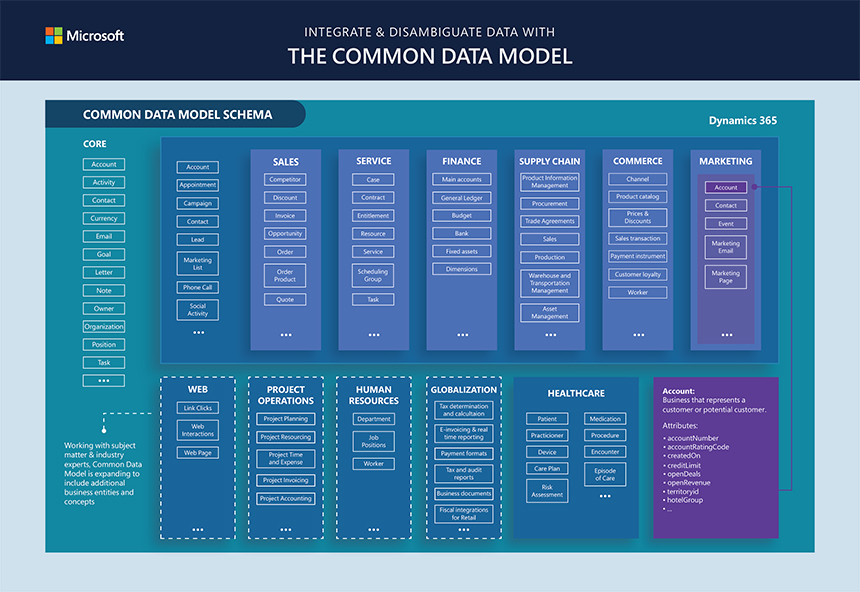
    Then we advance to defining a new metadata model which relies on your decision in step 1. In this phase, you will generally compare your source system’s data model with your target system’s model and subsequently merge the data models to a single global data model, which helps you cover all data. Plus, having global metadata enhances the quality and findability of your SharePoint Online content.
    Step – 4: Classify All Content According To The New Metadata Model

    One final step that can help to boost your content’s findability before proceeding to the actual transfer is to add metadata tags that help to classify your data. If you’re handling a large volume of data, you may consider using a content classifying tool to automatically classify the data from your source system easily.

    Step – 5: Transfer Your Data Into SharePoint

    Completed all the steps above? Excellent! Now you have well-organized and structured data and are ready to transfer your data into SharePoint Online. Your cleaned-up house makes data management in SharePoint Online a breeze, and your productivity will most certainly improve significantly.

    Step – 6: Download & Install the Microsoft SharePoint Migration Tool

    • Click on Office 365 App Launcher > Admin

    • Navigate to SharePoint Admin Center

    • Under Migration, click on Desktop tool (SPMT) (SPMT = SharePoint Migration Tool)

    • Click the Download tool button to download the software

    • Once downloaded, install Microsoft SharePoint Migration Tool on your computer by clicking on the downloaded file

    • Next, you will need to log in to the tool using your Office 365 credentials

    Step – 7: Perform Your First Migration

    Using Microsoft Migration Tool is as simple as ABC, which is why I love the tool. You literally do not need any special skills, technical knowledge, or high IQ to use it. I’d walk you through the process of migrating file shares to SharePoint Online with the help of the Microsoft SharePoint Migration Tool.

    • Click on Start your first migration button

    • A box will pop up with options that allow you to easily choose your source files, whether it’s from your local computer or a network file share. Individuals who are already on the old SharePoint can migrate to SharePoint Online by clicking on SharePoint Server. Since we’re considering migrating from files share to SharePoint Online, we will select FileShare.

    • Next up, select the source of your files, i.e., the actual folder you desire to migrate. The folder can be on your C: Drive or on a network drive. Once you’re done, click Next to proceed.

    • Paste the URL of the SharePoint site you want to migrate to on the empty box on the next screen
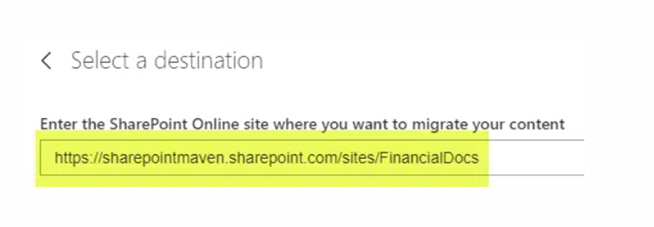
    • It’s important to note that when pasting the URL, you should only paste the URL of the site and not a page of the site. For instance, if you paste a page URL such as “https://sharepointmaven.sharepoint.com/sites/FinancialDocs/SitePages/Home.aspx,” it will return an error: “The site does not exist. Please create the site first before continuing the migration.” This is because you pasted the URL of a page instead of the main site. You need to remove the SitePages/Home.aspx at the end of the URL and paste only “https://sharepointmaven.sharepoint.com/sites/FinancialDocs/.”

    • If you input the correct URL, you will immediately get a list of all document libraries existing on the site. You can then choose the library you desire to migrate to

    • Click Next

    • On the next screen, you can give your migration a name and click Next

    • Once you’ve completed all the above steps, hit the “Migrate” button to start migrating. Accept all default settings if you’re doing basic migration, but you can alter some advanced settings by clicking “View all settings.”

    • You will now see the progress of the migration live on your screen

    • When migration completes, you will get a confirmation message

    • Click on the save button to save the message, as you will need it to perform incremental migrations later, and you can view the detailed migration reports when you click “View reports.”

    • When all processes are completed, your migrated files will appear on a site (document library) like the image above. You will observe that Modified Date metadata is preserved by the migration tool and does not default to today’s date (migration date), which isn’t the case if you were to migrate manually by dragging and dropping the files. Another thing to note is the System Account which appears under Modified By instead of your name (and that’s excellent!)

    Conclusion

    Voila! Now you’re ready to start enjoying all the benefits of managing your business data via SharePoint Online. Effortlessly integrate with the Microsoft Office Suite, including Microsoft Excel, PowerPoint, Word, Unified Communications, Exchange Server, etc., and drive your business to optimal performance.

    Written By – Adam Pittman
  • Best IT Support Companies in Raleigh, NC

    Best IT Support Companies in Raleigh, NC

    The Best IT Support Companies in Raleigh

    Want to take the trouble out of looking for an efficient and reliable IT Company in Raleigh? Business owners and managers know technology’s critical role in their businesses. But finding and maintaining an internal team of experts to support your business may be difficult and expensive for small to medium-sized organizations. Therefore, managed IT service providers exist and can be a game changer for many businesses striving to grow. We know how overwhelming it can be when you are searching for the best Raleigh IT Support Company to partner with for your business.

    Your goal is probably to find a reliable IT firm that is highly knowledgeable and can help you make smart business decisions to drive your productivity while happily supporting your day-to-day operations. With so many Raleigh IT Companies to choose from, selecting the best IT company for your needs can be a daunting challenge. Don’t Stress! We’ve done the hard work of collecting Raleigh’s top IT service providers based on four essential criteria.

    Technical Expertise
    Responsiveness
    Customer Service
    Solid Reputation

    The Top 10 Best IT Companies In Raleigh

    1) Computerbilities

    With more than 25 years in business, Computerbilities is a disabled- veteran-owned small business in the IT support industry. Computerbilities has been offering IT support to small companies Since 1995 in an industry where firms generally come and go every few years. They offer services throughout the entire Raleigh- Durham area, primarily to contracting and sub-contracting businesses.  

    Computerbilities is dedicated to their clients, evidenced by their client relationships’ longevity. Computerbilities has numerous clients who have been with them for over ten years, a few longer than 15 years. They know that a client’s IT needs are driven by business needs. Therefore, Computerbilities works with clients to help them realize their business objectives by designing, implementing, and supporting ‘business-driven’ technology solutions. 

    Valuing being a friendly and highly responsive extension of their client’s IT needs, Computerbilities prides themselves on answering all their calls live during business hours, guaranteeing a 6-minute response time!  

    They offer a complimentary 1 Hour Network Assessment to prove the quality of their services, and all their work is backed by a 100% No Hassle Money Back Guarantee. 

    Some of the services Computerbilities provides to their Raleigh small-medium business clients are: 

    2) Benton Technology Solutions

    Founded in 2009, Benton Technology Solutions is another reputable IT company in the Raleigh, NC, area. These guys offer a wide range of tech solutions—from IT support, cloud solutions, and cybersecurity to web filtering and hosted PBX services.  

    They offer the following options on their website: 

    • Cloud & Hosting Services 
    • Network Management 
    • IT Security Services 
    • Strategic Technology Planning 
    • VoIP phone solutions 
    • Mobile Network Security 
    • Web Traffic Filtering 
    • Hosted PBX services 

    3) Scarlett Group

    Since 2006, the Scarlett Group has been providing IT services to companies in all of Raleigh and in numerous other states, including Florida, Jacksonville, New York City, Austin, Texas, and many more. The goal, more than just providing technical support, is to help businesses achieve their organizational objectives. In their Raleigh IT section, they describe themselves as business professionals, as well as expert technicians: 

    “We are passionate about innovation and problem-solving, and we believe technology is the key to success. Every solution we provide is driven by experienced people who are determined to understand your business goals and align your IT infrastructure to help you achieve them.” 

    These are the services provided by the Scarlett Group: 

    • Comprehensive IT Discovery 
    • Limitless Proactive IT Support 
    • 24/7/365 Network Monitoring and Human Support 
    • Managed Network and Endpoint Security 
    • Managed Backups and Data Safety 
    • IT Budgeting and Forecasting 
    • Preventive Maintenance 

    4) Managed IT Solutions

    Acquired in 2015, Managed IT Solutions is focused on providing IT solutions to small and mid-sized businesses in the Raleigh, Durham, and Chapel Hill areas.  

    As an IT solutions provider, we know the importance of communication for the success of IT service; that’s why we consider MITs one of the best IT companies in Raleigh. They are committed to providing fast, friendly, and highly responsive IT services.  

    Like they say on their About us page: 

    “We allow you to do just that while in the background; we work 24/7 to keep your technology working and secure. Whether you’re looking to keep IT costs predictable, avoid unexpected problems, communicate more effectively, or make a plan for business continuity”  

    Services you can get with Managed IT Solution: 

    • Fully managed IT support 
    • Cybersecurity assessments and fully managed solutions 
    • Virus and spyware removal and protection 
    • HIPAA assessments and compliance plans 
    • VPN (Virtual Private Networks) 
    • Remote access 
    • Server installations, upgrades, and management 
    • Spam filtering and email solutions 

    5) XceedIT, Inc

    The guys of XceedIT are clear on what is essential in the IT industry. They are committed to caring about their customers’ satisfaction, increasing work accuracy, and always providing a fast response to their clients. 

    We couldn’t agree more with their values: 

    “We are professionals who take pride in delivering affordable, best-of-breed IT solutions and services with a friendly and patient attitude. Our mission is to deliver comprehensive IT services and management that benefit your business success.” 

    These are the tech solutions that XceedIT has to offer: 

    • Managed IT Services 
    • IT Consulting 
    • Procurement 
    • Cloud Solutions 

    6) CMIT

    CMIT is a nationwide, managed IT services provider that combines local expertise with the strength of a national network. 

     This company, which has more than 20 years of experience and more than 200 locations, offers tailored service and support to small businesses. 

    “Our goal is to provide the IT support that local businesses need to thrive. We live and work here, too, and when our local business community is thriving, we also benefit.” 

    CMIT offers the following services: 

    • Managed IT 
    • Data Protection and Backup 
    • Cyber Security 
    • Networking 
    • Network Security 
    • Hosting and Cloud 
    • Applications 
    • Mobile Device Management 
    • IT Procurement 
    • Virtual CIO/CTO 

    7) A Step Ahead IT

    A Step Ahead IT is another good Raleigh IT company. They’re a forward-looking company that helps you keep up with new technologies so your business can stay competitive. In their own words, this is how they describe themselves: 

    “You can relax knowing our partnership with your organization means we take your IT personally and strive to keep your staff productive with the tools they need to drive your business forward. 

    Change the way you think about IT with A Step Ahead IT.” 

    These are the services offered by A Step Ahead IT: 

    • Managed IT services  
    • IT security services 
    • Cloud Computing services 
    • Medical and legal technology  
    • Data services 
    • Workflow automation 
    • Hardware services  
    • Software services 

    8) Electric

    Electric is a nationwide business that has gained tremendous growth since the rise in popularity of remote work!  

    This is how Electric describes its process:  

    “When building a business, time is your most valuable resource. The last thing you should worry about is an IT solution that can’t keep up. As the world transitions to remote and hybrid work, many organizations are questioning their next best steps. Electric can help you transform IT into your business’s strategic advantage. 

    Services: 

    • Managed Services 
    • Cloud Computing 
    • Cybersecurity 
    • IT Strategy 
    • VoIP Phone 
    • Business-Class Internet 

    9) CSP Inc 

    The expertise with which CSP performs its work is the result of more than 25 years of experience in the technology field. From their website: 

    ” We are truly blessed by this sustained success and do not take it for granted. It is humbling to consider all of the friendships and partnerships we have cultivated over the years and the many businesses we have helped!” 

    Services that they provide: 

    • Managed IT Services 
    • Assessments & Consulting 
    • Voice & Collaboration Solutions 
    • Data Center & Virtualization Solutions 
    • Mobility & Wireless Solutions 
    • Security Solutions 
    • Business Continuity Solutions 
    • Email Security and Archiving 

    10) ThinkTech Advisors

    Celebrating over 20 years in business, Think Tech Advisors is advocated to help small companies to solve their technological problems. For Think Tech Advisors, their customers are the #1 priority; that’s why they run the company under the values of integrity, determination, establishing good relationships, and helpfulness. In their own words: 

    ” ThinkTech views each client relationship as a partnership and places great emphasis on building those relationships. It is our belief that these relationships will allow our clients to experience the benefits of new technology deployments at a quicker pace. This will lower the total overall cost of ownership and provide easier transitions to new technologies. 

    Think tech offers the following Raleigh technology solutions: 

    • Managed IT Services 
    • Cloud Services 
    • IT Consulting 
    • Cybersecurity and Compliance 
    • Virtual CIO Services 

    So, which IT company in Raleigh will best meet your needs?

    Computerbilities offers the best in the local industry when it comes to IT solutions. The company has a strong reputation, is dependable and responsive, offers customer service that can’t be beaten, and is in the same area as you. 

    To find out how Computerbilities can provide Raleigh Managed IT Services for your business, please email us at sales@computerbilities.com or call us at 919-469-5060. 

    Written By – Rebecca Pearce (IT Marketing Coordinator)

  • Scientists are building the world’s largest hard drive , made of DNA.

    Scientists are building the world’s largest hard drive , made of DNA.

    Scientists are building the world’s greatest-capacity hard drive, much smaller than you might think. The storage space will theoretically be only a few millimeters in size. Still, they will require researchers to obtain hundreds of terabytes of data to test the prototype.

    The hard drive prototype was created by Dr. Nick Goldman and his team at the European Bioinformatics Institute in Cambridge, United Kingdom.

    Every day, trillions of megabytes of data are being generated. That is nearly two million years’ worth of MP3 music being developed daily. Inevitably, all this data needs to be stored.

    Current forms of data storage, such as hard drives or CDs/DVDs, house a limited amount of data in a given space. With more and more data being created, higher density data storage methods are required.

    Using DNA from cells, they’ve converted digital files into DNA code, and they’re able to store that data in a much smaller way than what we’re used to. In fact, it’s so tiny that you can’t even see it!

    With this new technology, scientists can store unlimited movies, music, and files indefinitely. The prototype is still in the early stages of development but in another 10 or 20 years? After that, you might be able to store trillions of terabytes on your DNA hard drive!

    Hopefully, they’ll continue to find ways to make DNA data storage more effective and streamline the process. It’s not a replacement for traditional storage, but it’s promising for the future. And who knows? Someday in the far-off future, you might build your own DNA hard drive.

    Currently, data storage in the cloud is the most cost-effective and efficient method to safely store data. If you are interested in moving your data to the cloud, please contact us at (919)469-5060 or email sales@computerbilities.com.

  • What is Juice Jacking? Why You Should Not Use Pubic USB Ports and Chargers

    What is Juice Jacking? Why You Should Not Use Pubic USB Ports and Chargers

    Juice jacking is very dangerous when it comes to data theft. Juice jacking is what happens when attackers compromise an unpatched public charging station or internet port with malicious software.

    Once inside, thieves can copy personal data like credit card numbers, names, addresses, Social Security numbers, and phone numbers.

    It is extremely easy to juice jack a public facility because it involves plugging a charger into an unguarded charging station or port, and then waiting for someone else to turn off the power supply. When the power supply is turned back on, the attacker’s malware will begin working on gathering and exfiltrating data.

    Public Charger Safety Tips

    You might have noticed that your wireless router was powered down recently (or that it stopped being accessible), even though it hasn’t been touched. Many companies have added an additional safety feature called “JuiceJack Defense” because of the increase in public charging stations that people use today.

    Unfortunately, these protections only work with certain models of wireless routers and won’t be available on all devices that come from those manufactures. You can also purchase your own Data Blocker such as this USB Data blocker.

    So the next step is to check to see whether your device is a victim of juice hacking, and take steps to stop juice jacks before it gets too far.

    Check to see if your modem has public access controls

    Modems are considered vulnerable to juice jacking for two reasons: First, modems are often designed to automatically reboot or shut down themselves after 30 seconds or 1 minute of non-action, depending on brand. If they don’t automatically shut down, attackers know where to poke around. Second, they often have a web interface that allows them direct access, making them especially susceptible to juice jacks.

    Don’t Leave Equipment Outdoors During Winter Months

    Many manufacturers claim that they have addressed juice jack dangers by limiting power to the ports to avoid damage during extreme weather conditions. Unfortunately, even when they say that the ports cannot be exposed in subfreezing temperatures, people still have left equipment outdoors anyway. Even if a manufacturer isn’t saying that they can’t be exposed to freezing temperatures, it makes sense that people would simply leave the equipment outside for longer periods when bad weather is forecasted.

    Use An Antivirus Appliance On All Computers

    An antivirus appliance can identify juice jacks quickly before they cause physical harm. The best antivirus appliances are updated frequently, use up-to-date software libraries, and regularly scan files that move through the internal network. A good antivirus appliance will also notify you right away if its virus signature database contains a match.

    To summarize this topic, make sure that all computers in your company have appropriate defenses against juice jacks so that people don’t get hurt by their own equipment. Don’t trust public charging stations – keep portable phones, tablets, and laptops locked in your car while plugged into them. Don’t ever plug electronics into a network port that isn’t secured. And finally, don’t ever leave equipment connected to a network port, even if you believe that the manufacturer says it is safe.

    If you have questions or concerns about the security of your devices, please contact us at (919) 469-5060

    Public USB Port and Chargers

  • 4 Reasons Why North Korea’s IT Program Is Dangerous 

    4 Reasons Why North Korea’s IT Program Is Dangerous 

    North Korea has a long history of building nuclear weapons and ballistic missiles. However, the government is now looking to increase revenue for its nuclear weapons and ballistic missile programs by outsourcing IT technicians to other countries.

    North Korea is sending IT workers overseas to raise money for its nuclear weapons and ballistic missile programs, the United States said on Monday.

    Discover why your business needs to avoid hiring these IT technicians at all costs.

    Avoid North Korea IT Technicians

    1. Funding an enemy state

    North Korea is one of the most closed-off countries globally, and it’s tough to get any information out of the country.

    But one of their top priorities is developing cyberattacks to disrupt foreign communications and government programs. And one of the countries that the government spends the most time targeting is the US because of America’s role in the Korean War and the country’s economic and political policies.

    The country’s cyber attacks can be both military and criminal. This includes attacks on foreign governments, businesses, and financial institutions.

    One of North Korea’s significant ways to make cyber attacks happen is sending out malicious software pieces to people on the internet. We do not want any United State dollars funding these types of projects.

    2. Hurting relationships with US Allie’s: 

    North Korea has been a thorn in the side of the world for years. Their nuclear program has made them an international pariah, and the country has spent many of those years building rockets and weapons that threaten to blow up.

    However, that doesn’t mean we should support the country or its leader, Kim Jong-un, for fear of losing access to information. If we do, we are making the mistake of hurting our relationship with our allies. 

    3. Endangering the US and private companies to new, undetected viruses from North Korea

    If North Korea’s cyber security is a concern, the country needs to get its house in order. Of course, that’s not a popular opinion in the United States, but some experts have some insight into the country’s IT infrastructure.

    It’s unclear what type of technology North Korea is running and how much control they have over it. But, these unknown viruses could potentially pose a great risk to the the United States and our businesses.

    4. The possibility of hiring a third party using North Korean services

    North Korea is a dangerous place, but the danger is in the IT realm. If a nation as small as North Korea can hack the U.S., it’s not far-fetched to think about what the likes of China could accomplish.

    If we’re not careful, North Korea could damage the U.S. through cyber-terrorism or the spread of propaganda.

    If you want to protect your business, your government, or your family from a cyber-attack, you need to be vigilant about protecting your data. Hiring a third party can be risky if North Korea is a country that cannot be trusted.

    North Korea's Flag

    In conclusion, Kim Jong-Un has proven that he is a dangerous leader; therefore, other countries should take note of the North Korean nuclear development program. If other countries aren’t careful, North Korea will use its weapons to benefit only the ruling class of North Korea and not the rest of the world. Therefore, other countries will start to see how their governments react to a nuclear attack and think about whether atomic weapons are a viable option. Are you concerned about your business’s security? Please contact us to schedule a Free Network Assessment! 919-469-5060

  • 10 Benefits of IT Support & Solutions for North Carolina Businesses

    10 Benefits of IT Support & Solutions for North Carolina Businesses

    Regardless of if your small or medium-sized business is starting or you’re an established corporation, a proactive IT service & solutions provider will support your company and allow you the freedom of focusing more on growing your business.

    If you are not sure what an IT managed service provider can offer, read on to explore the many benefits of our IT support and solutions consulting to clients across North Carolina.

    What is IT Support & Solutions?

    IT solutions are necessary for the world we’re living in.

    In a technologically advanced world, it’s no surprise that we’ve developed information technology to keep up with our increasingly complex needs.

    From computers and cell phones to cyber security and office phones, IT solutions for your North Carolina business are essential to ensure that these tools can be used effectively and provide their full benefits.

    In the simplest terms, IT solutions are the process of offering assistance with these technological devices when they aren’t working correctly or at all. For example, this could involve repairing a computer or cell phone, fixing up a printer, managing your Microsoft Office 365 email accounts,  troubleshooting software issues, etc.

    Managed IT services consist of outsourcing the responsibility for maintaining and anticipating the need for a range of processes and functions,  for improved operations, and reduced budgetary expenditures by reducing directly-employed staff.

    When you’ve invested in technology like this, it makes sense to have a place you can go for help when you need it. Don’t let your computers and phones become obsolete just because they won’t work right—get them fixed!

    Managed services

    are an alternative to the break/fix or on-demand outsourcing model. The service provider or break-fix model performs on-demand services and bills the customer only for the work done.

    The managed services provider (MSP) is an experienced IT professional who delivers a full range of managed services and solutions to clients requiring this level of support.

    The managed services provider performs on-demand maintenance or other organized service activity the client requires. A negotiated contract is signed between both parties, outlining the work scope and associated performance and quality metrics.

    Business growth using IT support & Solutions

    H2- Benefits of IT Support & Solutions

    If you want to stay up-to-date on technology and have the latest IT solutions, you need to adopt managed services. This is an efficient way to address issues related to cost, quality of service, and risk, and it’s how many SMBs and large corporations are migrating their IT infrastructure components to the cloud.

    Managing day-to-day IT services processes and reducing related costs are enormous burdens for many businesses, so they need experts who can help them out.

    FOCUS ON YOUR BUSINESS. WE MANAGE YOUR TECHNOLOGY.

    IT costs can be a significant drain on your business’s profitability. Below are a few benefits of hiring an expert IT support company in NC to manage your company’s technology.

    1. Predictable & Scalable Spending: Managed IT services allow you to create a predictable and scalable spending plan for your business. For example, instead of investing in expensive hardware, the cost is consolidated into a single, fixed set of costs.

    This means that items like hardware breakdowns, maintenance, and repairs are calculated into your operational budget, so they won’t break the bank when they unexpectedly occur.

    2. Avoid Sunk & Operational Costs: While having an in-house IT team can be convenient and a good fit for some businesses, it brings high sunk costs that don’t add value to the company. Looking at all the operational costs of running an in-house team might surprise you how much money you could save by outsourcing your IT needs.

    You want to focus on the core functions of your business. While hiring an in-house IT staff can help streamline these processes, and it often comes with high costs that are difficult to justify.

    A managed services provider (MSP), on the other hand, is a one-stop solution to everything that falls under IT. It’s a scalable option that allows you to pay only for what you use—a great way to keep your IT costs under control.

    3. Faster Response Time: Your employees are the lifeblood of your company, so they can’t be slowed down by downtime or technical difficulties. Especially during busy times, having 24/7/365 support is necessary to ensure that your team stays productive.

    4. Expertise and Experience: Reduce labor costs: The right technology can be a real-time saver, allowing you to work fewer hours and still get the job done. IT solutions providers will implement your technology and troubleshoot. Taking your employees away from those tasks and allowing them to focus on your core business

    5. Data Compliance Support: Many businesses are expected to meet strict rules and requirements for integration with their IT systems. A few of these are the Family Educational Rights and Privacy Act, the Sarbanes-Oxley Act (SOX), and the Health Insurance Portability and Accountability Act (HIPAA).

    These standards spell out specific guidelines regarding privacy, financial services, retail establishments, and reporting and security in healthcare. While your business may be able to create a team to support these needs, managed IT providers are well-versed with the necessary regulations.

    6. Cyber Security Support When it comes to your business’s security, you can’t afford to be unprepared. Having an up-to-date and comprehensive cybersecurity strategy is essential in the modern world. But managing your security can be a massive headache, and if you don’t stay on top of it, your efforts could be wasted.

    That’s why you need managed security services. With managed security services, you know that you’re getting the latest information about threats and are protected from them 24/7. In addition, you’ll have access to experts who will keep your business safe without having to hire those experts yourself—allowing you to save time and money while increasing your peace of mind.

    7. One Point of Contact to Vendors: Your managed solutions provider will negotiate directly with your IT vendors and act as your single point of contact. A good provider has the leverage to get their clients the best rates on equipment, so you never overpay. In addition, if a situation ever comes up in which an IT vendor experiences an outage or other problem that impacts your business, they know whom to call.

    8. Cut Time to Market: There’s no need to reinvent the wheel—IT management that includes cloud computing can be a huge help. This strategy brings high-speed resources to the table, eliminating IT inefficiencies.

    9. Reduce risk: It’s a fact: every business investment carries a degree of risk.

    You’re dealing with financial conditions and changing technologies, government regulation, and evolving market conditions. All those are entirely out of your control, so it’s hard to be sure about the outcome.

    Most people would agree that risk is inherent in any business venture—that’s how it goes! But you don’t have to settle for uncertainty or hope for the best.

    Outsourcing your IT helps mitigate typical business risks. In addition, you will have experts on hand who know the ins and outs of the entire industry and security and compliance concerns.

    Conclusion!

    Managed IT services have many benefits for businesses in North Carolina. Overall, managed services make it easier for you to expand, update and employ the latest technologies. If you want to know more about the benefits of managed IT services, book an appointment with our team today. Call us today! (919) 469-5060

  • 3 Critical Factors When Choosing an IT Support Company in NC.

    3 Critical Factors When Choosing an IT Support Company in NC.

    Every company needs to have a plan for when things go wrong with their computer systems. IT support companies can be an invaluable asset to any business and help ensure that your system is working correctly and efficiently. When it comes to finding the right IT support company in NC, you need to consider what each company has to offer and how it will benefit your business.

    Now, How Do You Find The Right Fit For Your Company?

    IT support companies can help you save money on computer repair costs and reduce the amount of time you are down due to computer problems. You must hire a reputable IT support company to get the best service. There are many different types of IT support companies in North Carolina. Still, the most common styles include managed service providers MSPs, network administration and network engineering firms, and computer repair shops.

    How do you choose a good IT support company with so many options? It’s not an easy question and often stumps many business owners. If you have an in-house tech staff, we get it—you could keep doing what you’re already doing. But if you don’t have the internal IT department, this is where it gets tricky….you need to find a solution. But how? Most of the information out there tells the wrong story or leaves out key details that could steer you in a different direction. And when you contact local agencies, they’ll ask you what services and packages you are looking for. This can be overwhelming and paralyze rather than empower a business owner to make the right decision.

    Chances are if you are a small to medium-sized business with little to no IT support system you are looking for a Managed Service Provider or MSP. Looking for a way to reduce information technology (IT) costs and increase operational efficiency? You’re in luck: managed services are here to help.

    Managed service providers (MSPs) are organizations that offer a range of business processes and functions, from IT to technology consulting and even website management. For a fixed monthly fee, you have access to these services. It’s a contract-based model that allows you to outsource your services so that you can focus on the more important parts of running you business—like making money.

    With an MSP, you don’t have to worry about hiring or training staff in all areas of your business’ technology needs. Instead, you have access to the experts at your managed service provider’s organization, which will save you time and money while reducing risk and increasing operational efficiency.

    1. Questions You Need To Ask When Making This Decision:

    If you want objective advice on how to improve your technology setup, you need an expert opinion. But how do you find the right company? Here are some things to keep in mind when searching for an IT partner in North Carolina:

    1. Ask questions – How long have they been in business? Are they experienced in your industry? Will they take the time to get to know your business? Do they offer remote monitoring and management services? These are just a few questions you should ask as part of your due diligence process. The more information you gather about potential candidates, the better your organization’s chance of finding a good fit.
    2. Get recommendations – If someone recommends a company, ask them why they like that firm and if there are any doubts

    2. What qualities do you look for in a reliable IT solutions company?

    We’re saying that all the information out there is a bit messy. And in the end, it cannot be easy to find a clear path forward. You aren’t alone if you’re struggling with your current IT provider and don’t know which way to turn. We understand your frustration and are here to help!

    You want a company you trust and can be a partner and an extension of your own business. Here are key indicators of a reasonable IT solutions business when meeting with potential contenders.

    • Proven track record: You interviewed 2-3 of their existing clients, and they are happy with their services and support.
    • They answer the phone when you call! Responsiveness is critical even in the introduction phase of the relationship.
    • They are clear about pricing and don’t have many small hidden fees with their IT support plans.
    • They cover all their bases. This means they care about all of your technology workings and focus not only on specific aspects.
    • They stay up with current tech trends and new products.

    reasonable IT solutions

    3. How Is The Budget Going To Look?

    Feel free to ‘Let your guard down on the price

    Don’t choose a company based on price; choose one that will do the best job. The main thing you must keep in mind when working with an IT support company is that they are there to help. Don’t bend or break their rules or policies just because you want something done a specific way. Instead, work with them and understand whom and how you should contact them for help. By clearly defining all of your needs, support, and solutions, deliver what they promise. Finding an IT support company in NC will be an extensive process because of the many choices.

    North Carolina

    Technology is essential for your business, but it’s not always easy to keep up with the ever-changing world of IT and networking. An Managed IT Service provider company in NC can help you implement a better, more secure network and give you all the technology you need to stay on top of your competition. For business owners choosing the right IT support provider can be intimidating and stressful. Computerbilities is here to guide you along the way. Computerbilities has have been helping businesses throughout the North Carolina Triangle area navigate technology for over 25 years! Call us today for a Free Discovery Call 919-46-5060

  • Empower Your People with Innovative IT Support & solutions.

    Empower Your People with Innovative IT Support & solutions.

    Technology is essential for employee productivity and success in this digital working age. Empowering your employees with the right technology solution is one of the best things you can do for your business. There are quite a few parts to this empowerment: consolidating and simplifying your technology approach, improving business productivity, and preaching digital accountability to your team are just a few ways to give your employees the right resources to work optimally.

    Provide IT Solutions that supports Employees

    Beginning your managed IT support services journey can be overwhelming at first. But it is so important to get organized with your technology and find the right solutions for your business. Teaming up with an IT support company can benefit your technology journey. Traditional or in-house IT support may have enough capacity to cover your systems. Working alongside a technology firm and implementing these changes will significantly improve your technology stack.

    Consolidate And Simplify Your Approach: it’s clear that employees waste a lot of time and money on different software programs. For instance, if employees use email to communicate internally, they could be using Microsoft Dynamics CRM for lead management, Microsoft Exchange for scheduling meetings, Microsoft Remote Desktop for accessing shared files over the internet, and Lync for collaboration. The list can go on and on. If you consolidate and simplify your IT solutions, you will be in a better position.

    Implement one system that serves as a one-stop-shop for multiple functions. To identify the right approach, take a bottom-up approach: Survey your employees to determine which tools they enjoy using the most. Ask them what they like about each device. Then, select a system that mimics the tools they prefer to use. This strategy ensures they too will buy into your vision and use the new technology.

    Business Productivity/Online Training: Business productivity has become a huge buzzword. However, it’s surprising how many people are not produced in their roles. This is because it’s easy to fall into a routine and not be aware of what you’re doing. It’s also challenging to take the time to do things that will help you improve your business productivity.

    The good news is that some simple tips and tricks can help you boost your business productivity. The first step is to list everything you need to do every day to run your business effectively. Then, write down what steps you must take each day to accomplish those tasks. This way, you’ll be able to see exactly where your day goes and what areas could use more attention.

    You’ll also want to make sure that you take advantage of online tools for business owners. These include scheduling software and other tools such as Google Calendar, which can help keep track of appointments and meetings, so they don’t get missed. Using these platforms often requires focused sessions of training and organization to work optimally for your team.

    Finally, it’s essential to stay on top of your finances by using accounting software or an online service like QuickBooks Online or Quicken to know how much money you’re spending on various aspects of your business operation.

    Preach Digital Accountability To Your Team. Why Digital Accountability Matters: Digital accountability is about building trust by taking responsibility for your digital products, services, and practices. By committing to transparency and ethical practices, you create a foundation for the people who interact with your digital presence to trust you. Trust is the most significant currency online, so if you want to succeed in our increasingly digital world, you must understand why digital accountability matters.

    People prefer to work for, buy from, and invest in companies that act responsibly in today’s world. This means that companies must focus on integrating responsible practices into their operations. While this may have traditionally been focused on environmental or social responsibility factors, these days, it also encompasses being accountable for your digital products and services.

    By integrating responsible practices into the way you conduct business digitally, those who interact with your brand will be more likely to feel confident, leading to increased sales, higher employee retention rates, and better investor relations outcomes.

    Digital-Accountability

    What’s Next? Get the Right IT Support for Your Business!

    You might already know how important it is to have adequate IT support for your business—but are you getting the proper support? How do you compare with industry standards, and how can you improve?

    • Connect to an IT Support & solution Expert You might already know how important it is to have adequate IT support for your business—but are you getting the proper support? How do you compare with industry standards, and how can you improve?
    • Consult with an IT Solutions Company: Find an IT Solutions Company, to help you navigate the tech side of your business. Many companies provide complete technology solutions. This means they cover everything from Web Design to cyber security services.

    Still Your Business Need Innovative IT Support?

    If your business is anything like ours, it demands a flexible solution with the latest technology, expert staff, and proactive monitoring. We know that every business has specific needs, so we offer complete IT support tailored to your business goals. Our IT services extend from network administration to wireless connectivity and local productivity solutions to cloud-based backup. Our focus on customer needs means that you only pay for your business’s IT services genuinely required. We’re here to help you do more with less, and we believe that starts with empowering you with the information you need to take on your tech problems yourself. We can do that if you want us to tackle a project for you too! Call us to schedule a 1 hour Discovery Call at 919-469-5060

  • Sick And Tired Of The Robo Scam Calls – Heres The Solution

    Sick And Tired Of The Robo Scam Calls – Heres The Solution

    Who else gets 5-10 spam calls a day? Many phone carriers have been able to start detecting these incoming calls and label their caller Id as “Scam Likely,” but often they cannot detect who is calling. These spoof callers have been able to call from area codes familiar to your area or match your area code to get through.

    These calls get to be downright frustrating, and if you accidentally pick up once, it’s all over. You get about as twice as many that day. I looked up what to do about this, and thankfully the government has gotten involved.

    The FCC has started confronting these attackers by allowing you to file a complaint against the caller, enable call blocking tools, and giving you the following tips to prevent yourself from being spoofed.

    Here are a few other ways the FCC suggests taking action against them(2020):

    • Put your mobile and landline numbers on the national Do Not Call Registry. Visit donotcall.gov
    • or 1-888-382-1222 from the number you want to register.
    • Research apps, services or devices that help block unwanted calls.
    • Don’t answer calls from unknown callers. That could verify you have an active line.

    Following these guidelines can significantly reduce the calls and prevent fewer in the future.

    To learn more tips and tricks, visit the FCC’s website!

    https://www.fcc.gov/consumers/guides/stop-unwanted-robocalls-and-texts

    Continuing to respond to these calls and solicitations can put you at risk for giving up your information. Reframe from all contact with the spammers because you never know what they can steal from you. If you feel that your data has already been stolen. Computerbilities provides cyber security services to businesses in the Raleigh, NC area and can do a no-obligation Dark Web Scan to see if any of your information has been posted on the Dark Web. Contact us today to schedule yours!

    Stop Unwanted Robocalls and Texts. (2020, October 13). Retrieved February 01, 2021, from https://www.fcc.gov/consumers/guides/stop-unwanted-robocalls-and-texts

  • Why Touchless Tech Is-Going To Be Hot In 2022

    Why Touchless Tech Is-Going To Be Hot In 2022

    In the world of COVID-19 and the need to continually sanitize everything, there is a growing demand for technology to be even more accessible. Even without the touch of a button.

    Looking back before 2020, we wouldn’t think twice about the sanitation of public water fountains, tasting each other’s food, or even simply shaking someone’s hand.

    However, this COVID-19 pandemic has made the entire population aware of these unsanitary flaws in the system; eliminating many of these unsanitary practices will be something we see in the future.

    iPhone face scanners and touchless toilets were once considered highly advanced technology. They may be a feature included in even more products we see more of in 2022 and beyond as the world adapts to a contact-free lifestyle.

    These types of devices’ growing popularity will catapult a need for more advanced sensors and product development. Voice devices are also considered a category of touchless devices; the most popular devices are Apple’s Siri, Google’s Home Assist, and Amazon’s Alexa (2021).

    These devices’ popularity has resulted in many more manufacturers implementing touchless tech everywhere they can. However, there are some risks and concerns with this new tech.

    1. Security is a growing concern with voice devices. There have been numerous accounts of privacy violations relating to Amazon’s Alexa back in 2019. We still must be careful with the other hidden settings and disclosures in other voice-activated devices(2019). You never know who’s listening.
    2. Product failure is another risk that can be hazardous and inconvenient if your devices don’t work as planned. For example, a self-driving Tesla has a mechanical issue, then boom, a life-threatening accident, your Alexa records a nasty conversation you are having about someone and then sends it to them; yikes! The possibilities are endless for these errors. Big or small, they can cause quite a disruption!
    3. Bankruptcy for specific markets that do not adapt to the modern tech world is a reason for concern. What about shopping malls? People love to shop, but with Amazon Prime’s ease, shopping is touchless and extremely simple for the consumer. According to an estimate made by Green Street Advisors, more than half of stores in malls will be closed by the end the 2021 (Rey, 2020).

    We are entering a new age of technology; while this isn’t all bad, we must figure out how to adapt.

    What is a touchless device that you would like to see in 2022?

    Or want Computerbilities advice? We have worked with technology for small-medium-sized businesses in Raleigh, NC, with their IT support for more than 25 years. Contact us today to get a free network assessment and get our input on the best technology that fits your company’s needs!

    (2021, January 21). Retrieved from https://www.irishtimes.com/business/technology/hands-off-covid-19-is-fuelling-a-boom-in-touchless-technology-1.4462387.

    ‘Alexa, are you invading my privacy?’ – the dark side of our voice assistants. (2019, October 09). Retrieved January 22, 2021, from https://www.theguardian.com/technology/2019/oct/09/alexa-are-you-invading-my-privacy-the-dark-side-of-our-voice-assistants

    Rey, J. (2020, November 30). The death of the department store and the American middle class. Retrieved January 22, 2021, from https://www.vox.com/recode/21717536/department-store-middle-class-amazon-online-shopping-covid-19

  • Shocking Paypal Facebook Marketplace Scam Dont-Purchase Online Until You Know These 3 Things

    Shocking Paypal Facebook Marketplace Scam Dont-Purchase Online Until You Know These 3 Things

    Online shopping is blowing up the internet, now more than ever before, and we all know why! This pandemic has crippled the traditional shopping trends, and now Cyber Monday may be the biggest sale of the year.

    Not only do major retailers put their items on sale, but individual retailers and secondhand shops will also most likely have their deals as well.

    The Facebook marketplace has grown in considerable popularity in the last couple of years as a substantially accessible pathway for individuals to sell their used or specialty goods.

    Buying items through Facebook is often very affordable and accessible when the seller is local. But sadly, like every other enjoyable experience in life, there have been those who take others’ vulnerability to their advantage to make a profit.

    Don’t Purchase or Sell Through Any Online Platform Until You Know These 3 Things:

    1. Make sure the seller or buyer is credible, and they are correctly using the platform (Facebook Marketplace has their messaging system to keep track of transactions and conversations. If they message you outside of this system, it is an instant RED FLAG)
    2. The payment method they would like to use is not popular or is not lining up with PayPal or Venmo’s policy (see below to read more about how Paypal is getting compromised).
    3. They overpay you, or the seller wants too little for the product; this is often one of the biggest mistakes the scammers make!

    What is Paypal Scam on Facebook?

    A PayPal scam on Facebook is a type of online scam that uses the popular payment platform PayPal to trick unsuspecting users into sending money or personal information to the scammer. The scam typically begins with a message from the scammer, who may pose as a friend or family member, asking for money for an emergency or other reason. The scammer may also send a link to a fraudulent website that looks like the real PayPal website. If the user clicks on the link, they will be asked to enter their personal information, such as their credit card number or bank account information. The scammer will then use this information to steal the user’s money or identity.

    There are a few things you can do to protect yourself from PayPal scams on Facebook:

    Only accept friend requests from people you know in real life.

    Be wary of any message or request from a stranger who claims to need money for an emergency.

    Never click on links in messages from people you don’t know.

    If you’re unsure whether a website is legitimate, look for the “https://” in the URL and make sure the website is secure.

    Never enter your personal information on a website that you don’t trust.

    If you think you may have been scammed, you should report it to PayPal and your bank immediately. You should also change your passwords and monitor your accounts for any suspicious activity.

    Here are some examples of PayPal scams on Facebook:

    The scammer sends a message to a user claiming to be from PayPal. The message says that the user’s account has been suspended and that they need to provide their personal information, such as their credit card number or bank account information, to verify their identity.

    The scammer sends a link to a fraudulent website that looks like the real PayPal website. If the user clicks on the link, they will be asked to enter their personal information. The scammer will then use this information to steal the user’s money or identity.

    The scammer creates a fake PayPal account that looks like the real PayPal account. The scammer then sends a message to a user asking them to send money to the fake account.

    If you receive a message or link from someone you don’t know, be very careful before clicking on it or providing any personal information. If you’re unsure whether something is legitimate, it’s always best to err on the side of caution and not click on anything or provide any information.

    How Does facebook Marketplace Scam Works?

    Facebook Marketplace is a popular online marketplace where people can buy and sell items. However, it is also a popular platform for scammers to operate. There are a number of different scams that can occur on Facebook Marketplace, but some of the most common include:

    Fake listings: Scammers will create fake listings for items that are in high demand, such as electronics or furniture. The listings will often be priced below market value to attract buyers. Once a buyer expresses interest, the scammer will ask them to pay for the item through a wire transfer or other untraceable payment method. The scammer will then disappear with the money and never deliver the item.

    Overpayment scams: Scammers will offer to pay more than the asking price for an item. Once the buyer agrees to sell the item, the scammer will send a fake check or money order. The check or money order will initially appear to clear, but it will eventually bounce. When this happens, the buyer will be out the item and the money they sent to the scammer.

    Shipping scams: Scammers will ask buyers to ship items to them before they have paid for them. Once the buyer ships the item, the scammer will disappear with the item and never pay for it.

    Fake profiles: Scammers will create fake profiles that look like real people. They will then use these profiles to contact buyers and sellers and try to scam them out of money.

    There are a few things you can do to protect yourself from scams on Facebook Marketplace:

    Only buy from people you know and trust: If you don’t know the person you’re buying from, do some research on them before you make a purchase. You can look at their profile to see if they have any reviews or if they’ve been involved in any scams in the past.

    Never pay for an item before you see it in person: This is especially important for high-value items. If you can’t see the item in person, there’s a good chance you’re being scammed

    Meet in a public place: When you meet to buy or sell an item, do it in a public place where there are other people around. This will help to deter scammers and make it easier for you to get help if something goes wrong.

    Use a secure payment method: When you pay for an item, use a secure payment method like PayPal or a credit card. This will give you some protection if you’re scammed.

    If you think you may have been scammed on Facebook Marketplace, you should report it to Facebook. You should also contact your bank or credit card company and file a fraud report.

    How can you spot a Paypal scammer on Facebook?

    Here are some tips on how to spot a PayPal scammer on Facebook:

    Be wary of any message or request from a stranger who claims to need money for an emergency. Scammers often pose as friends or family members in need of help. If you receive a message from someone you don’t know asking for money, be very careful before sending anything.

    Never click on links in messages from people you don’t know. Scammers often use links to fraudulent websites that look like the real PayPal website. If you click on a link and enter your personal information, the scammer can steal your money or identity.

    If you’re unsure whether a website is legitimate, look for the “https://” in the URL and make sure the website is secure. The “https://” indicates that the website is secure and that your information is protected.

    Never enter your personal information on a website that you don’t trust. This includes your credit card number, bank account number, or Social Security number.

    If you think you may have been scammed, report it to PayPal and your bank immediately. You should also change your passwords and monitor your accounts for any suspicious activity.

    Here are some examples of PayPal scams on Facebook:

    The scammer sends a message to a user claiming to be from PayPal. The message says that the user’s account has been suspended and that they need to provide their personal information, such as their credit card number or bank account information, to verify their identity.

    The scammer sends a link to a fraudulent website that looks like the real PayPal website. If the user clicks on the link, they will be asked to enter their personal information. The scammer will then use this information to steal the user’s money or identity.

    The scammer creates a fake PayPal account that looks like the real PayPal account. The scammer then sends a message to a user asking them to send money to the fake account.

    If you receive a message or link from someone you don’t know, be very careful before clicking on it or providing any personal information. If you’re unsure whether something is legitimate, it’s always best to err on the side of caution and not click on anything or provide any information.

    How can you protect yourself from Paypal Scams on Facebook?

    Here are some tips on how to protect yourself from PayPal scams on Facebook:

    Only accept friend requests from people you know in real life.

    Be wary of any message or request from a stranger who claims to need money for an emergency. Scammers often pose as friends or family members in need of help. If you receive a message from someone you don’t know asking for money, be very careful before sending anything.

    Never click on links in messages from people you don’t know. Scammers often use links to fraudulent websites that look like the real PayPal website. If you click on a link and enter your personal information, the scammer can steal your money or identity.

    If you’re unsure whether a website is legitimate, look for the “https://” in the URL and make sure the website is secure. The “https://” indicates that the website is secure and that your information is protected.

    Never enter your personal information on a website that you don’t trust. This includes your credit card number, bank account number, or Social Security number.

    If you think you may have been scammed, report it to PayPal and your bank immediately. You should also change your passwords and monitor your accounts for any suspicious activity.

    Here are some additional tips to help you protect yourself from PayPal scams on Facebook:

    Keep your software up to date. Software updates often include security patches that can help protect you from scams.

    Use a strong password for your PayPal account. Your password should be at least 8 characters long and include a mix of letters, numbers, and symbols.

    Enable two-factor authentication for your PayPal account. Two-factor authentication adds an extra layer of security by requiring you to enter a code from your phone in addition to your password when logging in.

    Be aware of the latest scams. Scammers are constantly coming up with new ways to steal money from people. It’s important to stay informed about the latest scams so you can avoid them.

    By following these tips, you can help protect yourself from PayPal scams on Facebook.

    More About The Paypal Scam:

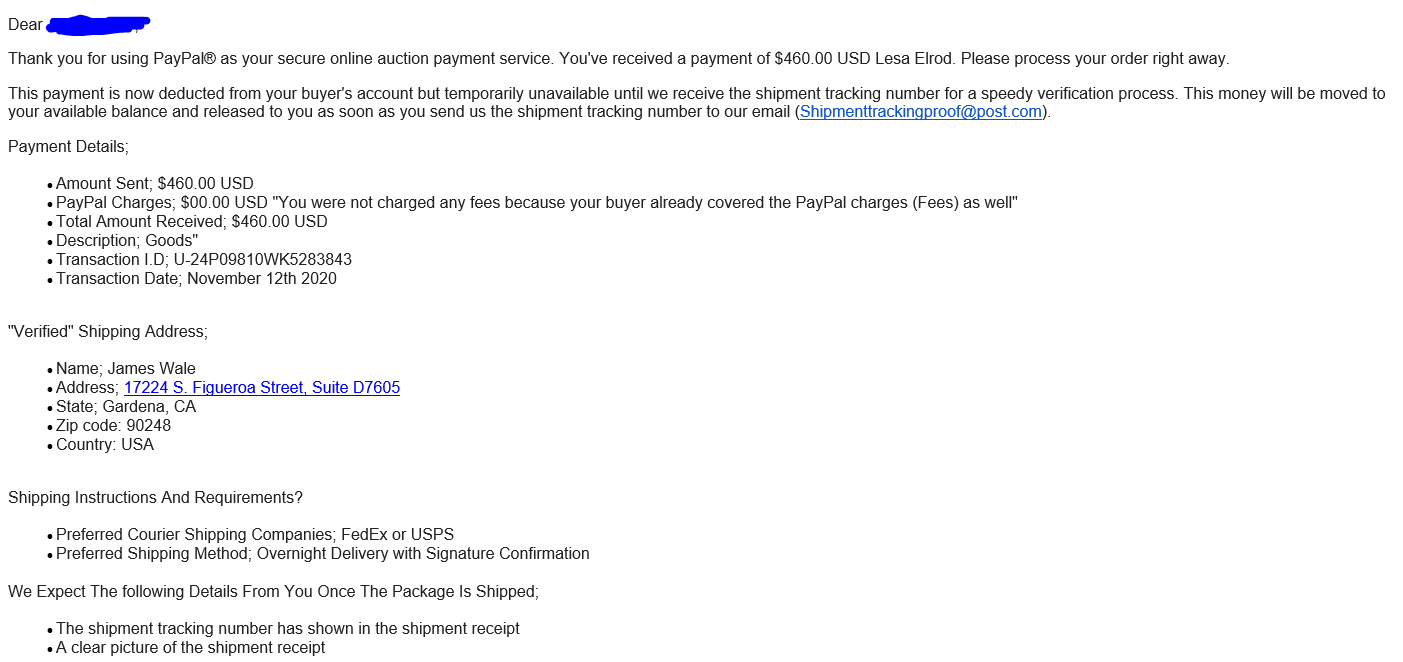
    Paying through Paypal is one of the most reliable forms of online payment there is. They are incredibly secure, but the hackers use a very well-formatted email that looks like it’s coming from PayPal.  The Hacker’s goal in this example is to get your product without paying for it.

    When you pay with PayPal, you can easily find the recipient by looking up the shipper’s email. The hackers use this to their advantage, asking for your email and name on the account. They then compose an email that appears to be sent by PayPal.  However, it doesn’t appear in your app until the product has shipped, and there is proof of shipment.

    Look carefully at the sender information in this email. It says it’s from Paypal.com, but look again; it is actually from Shipmenttrackingproof@post.com, which is not affiliated with PayPal at all.  A legitimate payment will always send emails from service@paypal.com.

    Paypal-Scam-email

    Now let us look at the full body of the email:

    Paypal-Scam-email-body

    Paypal-Scam-email-footer

    This seller would have paid the shipping cost for the scammer to steal the item! Now that is adding an insult to injury!

    While the scammers may have pulled this email template from a legitimate email that  PayPal uses, always check the three warning signs listed above before purchasing anything online.

    Have you been compromised? Contact Computerbilities for a Free no Obligation Dark Web Scan!

    https://www.computerbilities.com/dark-web-scan/

  • Scammers Are Getting Smarter And Even Targeting It Professionals

    Scammers Are Getting Smarter And Even Targeting It Professionals

    Scams are becoming a worldwide issue nowadays! Individuals go years or even their whole lives without realizing that they were a victim of a scam.

    Sadly, many discover too late that their information was previously compromised, after realizing that their bank account’s now drained or personal identity’s been stolen.
    But It’s not every day that one of our very own technicians can become a scammer’s target. Of course, the scammer didn’t know who he was calling!

    The other day our technician Chase brought up that he had gotten a sketchy phone call from a local number claiming his Apple ID was corrupted. The caller had asked to gain access to his computer to do a “network scan” to make sure there weren’t any unwanted devices.

    The caller then gave Chase an ID number and said that he would show their Apple Certificate to verify their identity once he gained access to his computer. Then he asked him for the payment of one $500 Google Play card and Five $100 iTunes Cards and said that it would be refunded in a given time.

    The caller realized that Chase was onto him and hung up. But OHH.. he really thought he was about to earn some big $$.

    Warning Sign #1: Apple will not call you if you are having an issue with an Apple ID.

    Warning Sign #2: The caller didn’t call from an 800 number (or known Apple number); instead, they used a spoofed number local to the area.

    Warning Sign #3: Payment in the form of a gift card is always a huge red flag that you are about to get scammed.

    These scams are commonly conducted through sites such as FastSupport.com or other legitimate remote access software, leading the victim to believe they are being helped.

    Usually, the scammer’s purpose is to gain access to your computer, promising to scan or fix a problem that you may have on your computer.

    In most cases, they will call you from a local number (like in Chase’s case), or you will see a type of popup/lock screen on the computer asking to call a “support technician” to fix your alleged issue. They will often claim that they are calling from Microsoft and attempt to portray themselves as legitimate as possible.

    Believe me, Microsoft will not be calling you to fix a problem unless you have contacted them first!

    Reading this article, you may now think, “well, now I know” or “I am too smart for this to happen to me,” but be careful thinking such things; these scammers are constantly changing their tactics and methods to get through to the most people they can.

    If you would like more detailed information on these types of scams, please read this article by Sensor Tech Forum (https://sensorstechforum.com/fastsupport-com-scam/).

    If you believe that you have been the victim of a Fastsupport.com scam or any other scam type, please contact a local IT Company in your area to get help.

    Computerbilities is offering FREE Dark Web Scans! See if your information or the information of a loved one has been compromised in a matter of seconds.

    https://www.computerbilities.com/dark-web-scan/

    Mihailov, T. (2020, May 20). FastSupport.com Scam – What Is It? (Update May 2020). Retrieved November 05, 2020, from https://sensorstechforum.com/fastsupport-com-scam/