Computerbilities, Inc.

Category: Blog

  • Watch Out For Fake Coupons On Social Media

    Watch Out For Fake Coupons On Social Media

    The fake coupon scam gained traction in 2016 and is still tricking consumers to this day. It becomes even more prominent around back-to-school, Thanksgiving, Mother’s Day, Black Friday, and Christmas.

    These bogus coupons claim to be from well-known companies such as TargetStarbucksWhole FoodsFood LionKroger, Aldi, Lowe’sDunkin DonutsKohl’s, Publix, Dollar General, and Bed Bath and Beyond. The coupons often claim to be in celebration of the company’s anniversary or birthday. Some of the offers that have been used in the past, include:

    • Free $30 gift card
    • 50 percent off store wide
    • $75 off any purchase
    • $50, $100, and $200 off

    Usually “all you have to do” to get the coupon is like the page, share the coupon with your friends, and fill out a survey.

    Once you click on the fake coupon, a couple of things may happen:

    You’re taken to a bogus website asking for personal information such as your name, phone number, age, email, and home address. You’ll find yourself completing survey after survey and never actually getting the coupon. Scammers often get paid for every completed survey, so it’s possible that they phish enough information out of you to retrieve passwords and access your accounts. Best case scenario, you just get bombarded with spam emails.

    Worst case scenario, you’re taken to some website you’ve never head of and that site starts installing malware on your computer.

    If at any point, you’re told to download an app or software to get the coupon, DON’T do it. It’s a scam.

    My Experience

    If I’m being completely honest, I fell victim to this very scam a few years ago. I saw several of my friends share an awesome Target coupon and figured if they posted it, it must be fine. I don’t remember the exact details, but I know it took me to a website where it asked me to fill out a survey. I completed the survey, only to have it redirect me to another survey. I really wanted that coupon, so I took a few more surveys before finally giving up. Next thing I know, I’m getting messages from friends telling me that my Facebook account was hacked. I went through my account activity and saw that hackers posted in groups and commented as me. It probably would have taken me weeks (or longer) to discover my account was compromised if my friends didn’t tell me. I immediately changed my password and started unsubscribing from the dozens of spam emails in my inbox.

    Lessons Learned

    Anything that seems too good to be true, almost always is.

    Businesses do not celebrate anniversaries by giving away hefty coupons to Facebook users who like and share posts.

    You know better. Nothing is ever free. Most companies can not afford to give out $200 to every person who likes their Facebook post. And when was the last time Starbucks handed out $100 gift cards like candy? That’s what their reward program is for.

    How to Spot a Fake Coupon

    Check to see if the Facebook page is legitimate.

    The Facebook page may look real. Scammers often steal logos and photos from the official page. Check to see if the page is verified (it’ll have a blue or grey circle with a check mark next to the name).

    Scammers will change the name of the Facebook page slightly. The official Facebook page may be called Aldi USA and the fake one may be called Aldi US. They also might use a page called “Aldi coupons” or “Aldi Deals”

    Not every company has a verified Facebook page. If you’re unsure if the page is official, go to the company’s website and look for their Facebook information there. You can also contact them directly to verify the name of their page or simply ask about the coupon.

    Pay close attention to the link destination, before even thinking about clicking on it.

    If the URL is Target.com-holidays.xyz it’s a scam. Make sure the link goes to the official company website BEFORE clicking on it.

    Check for fine print.

    All legitimate coupons have fine print containing terms and conditions, exceptions to the sale, and an expiration date.

    You’re required to fill out a survey, like or share.

    I looked at Facebook pages for several of the companies that are often targeted in this scam (Kohl’s, Target, and Starbucks) to find legitimate coupons for comparison. Out of the three companies, not one of them posted an actual coupon. They gave information about sales and deals, links to deals on their websites, and information about in-store freebies. Not once, did they ask you to share, follow, like, or fill out a survey to access the deal, offer, or in-store freebie. Note: things are slightly different regarding social media contests and giveaways. However, as far as coupons go, you will NEVER need to give out personal information or like and share a post.

    Check for low resolution or grainy images.

    If you’re still unsure of the legitimacy of a coupon, check out Snopes.com or the BBB scam tracker. Even better, contact the company directly to inquire about the coupon. 

    What to Do If You Spot a Fake Coupon

    Report it to the retailer mentioned so they handle it as they see fit (press release, warn customers, try to get it removed from social media, etc.)

    Don’t share it or click on it.

    If you see that your friends already shared it, tell them to change their passwords.

    Report it to Facebook.

    Examples
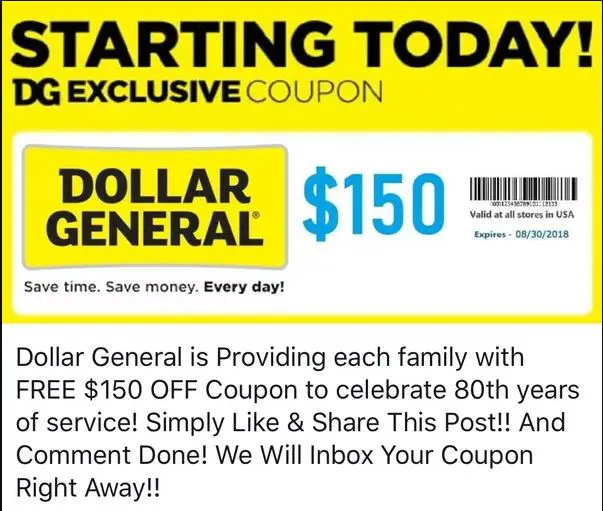
    Fake Dollar General Coupon from Facebook Scam

    This FAKE Dollar General coupon was circulating Facebook in June 2018. A real coupon would have more fine print. Also, take note of the odd capitalization and mistakes. Why is “Providing” capitalized? 80th years? SCAM! Yet it was still shared by thousands of people.

    The Starbucks gift card scam has been around since at least 2011 and it’s still fooling people today. This screenshot was taken from a post I saw on my feed yesterday. Look at the URL. It doesn’t go to the official Starbucks website. It goes to Starbucks.Happyhour.Cards. Pay attention to URL destinations!
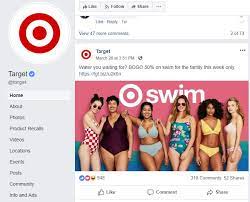
    Screenshot of Target Advertisement for Swimwear on Facebook

    First, notice how there is a check mark next to the company name. That means it’s a verified company. Next, you’ll notice it’s not an actual coupon. It’s a link to their website so you can shop the deal. Anyone can access the deal without liking, sharing, or filling out a survey.
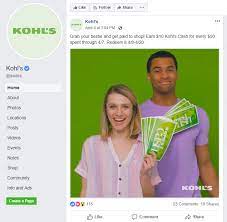
    Kohls-Facebook-Page-Advertisement

    You’ll notice the check mark next to the company name. Again, it’s not an actual coupon. It just mentions an offer. It touches on some of the terms and conditions (when you can earn it and when you can redeem it). Finally, it never asks for any personal information. You don’t have to fill out a survey or like or share anything to earn the Kohl’s cash.
  • Dont Fall Victim To Tech Support Scams

    Dont Fall Victim To Tech Support Scams

    What is a tech support scam?

    Tech support scammers want you to believe you have a serious problem with your computer. They want you to pay for tech support services you don’t need, to fix a problem that doesn’t exist. They often ask you to pay by wiring money, using a gift card, or a money transfer app. Tech support scammers have two main methods they use to trick people:

    Phone Calls

    Tech support scammers call and pretend to be a computer technician from a well-known company such as Microsoft, Dell, or Norton. They may even spoof the caller ID so that it displays a legitimate support number from a trusted company. They’ll then ask you to install applications that give them remote access to your computer and pretend to run a diagnostic test. Then they try to make you pay to fix a problem that doesn’t exist.

    If you get an unsolicited call claiming there’s a problem with your computer, hang up. Microsoft and Norton have confirmed they will NEVER call you unless you request it. Dell will never call you unless you’re signed up for their enhanced monitoring and support services, but they will never call you unsolicited.

    Pop-Ups

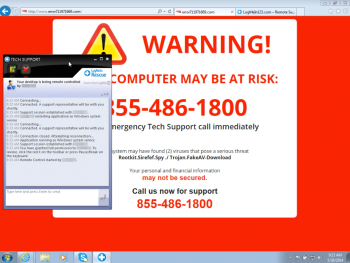
    Tech support scammers may try to trick you with a pop-up window that appears on your screen. It will look like an error message from your operating system or antivirus software. It might use logos from trusted companies or websites. The message warns of a security issue and tells you to call a toll-free number for help.

    Do NOT call the number. Real security messages will never ask you to call a number. Microsoft and Norton have both confirmed that they will NEVER give you a pop-up telling you to call for help. If you get one of these pop-ups, shut down your computer right away.

    Additional Tips

    If you need to contact Microsoft, Dell, or another well-known company’s support, get the number directly from the official company website.

    Never give control of your computer to a third party unless you know it is the representative of a computer support team you contacted.

    If you think you’ve been scammed: 

    1. Change ALL of your passwords. Change passwords for your computer, online banking, social media, email, and any other password protected websites that you visit.
    2. Contact your bank to report that there has been fraud performed on your account.
    3. File a complaint with the Federal Trade Commission and let the company know. Example: If the scammer was pretending to be from Microsoft, let Microsoft know.
  • Dont Just Throw Away Your Old Computer

    Dont Just Throw Away Your Old Computer

    When you dispose of, donate, or recycle an electronic device, you may disclose sensitive information which could be exploited by cyber criminals.

    There are a few ways to effectively remove all data from your devices. The method will depend on the type of device (ex. laptop, cellphone, digital camera).

    Keep in mind that simply deleting files from your computer doesn’t actually remove them from the device. Even if you empty the trash, the deleted files are still on the computer and can be accessed.

    How do I remove all data from my computer?

    To permanently delete data from your computer, you can use a disk cleaning software specifically designed to erase data.

    Another method to permanently remove data is overwriting. Overwriting deletes sensitive data and writes new binary data over it.

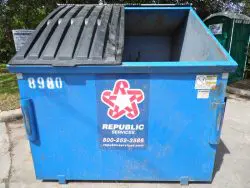
    The last method is physical destruction. Note: While fun, hitting your computer a few times with a baseball bat is insufficient. There are services that will disintegrate, burn, or melt your computer drive. If you choose not to use a service, you need to remove the hard drive and destroy it. Don’t try to use a magnet, don’t scratch it or just crack it in half. Smash or shred it into as many pieces as possible, or for best results, drill holes into it.

    Check out this interesting article about extracting data in criminal cases and where most criminals go wrong. (Obviously, we’re not condoning you destroy evidence. Only wipe old electronics to protect your personal information, not cover up a crime!!)

    What about my phone?

    Before disposing of a smartphone or tablet, be sure to remove all data by performing a hard reset, also known as a factory reset. This is done differently depending on the device but is usually done through the settings. On an iPhone you go to Settings >> General >> Reset >> Erase all content and settings >> Erase iPhone. Also, if your device has a memory card, physically remove it.

    Where can I dispose of my devices?

    After wiping your devices, you may choose to donate, discard, or recycle them. To find out where you can recycle electronics in your area, visit: http://www.ecyclingcentral.com/. To find out where you can dispose of electronics in your area, visit: https://www.epa.gov/recycle/electronics-donation-and-recycling.

    Wake County residents and businesses are lucky enough to have several special Wake County Recycling Facilities that accept old electronics.

    Of course, if you need help wiping your devices or disposing of them, we’re always happy to help.

    Call us today to schedule a FREE Cyber Security Assessment. We provide managed IT services for small to medium businesses in Raleigh, Cary, Durham, Apex, Clayton, Wake Forest, Chapel Hill, Holly Springs, and surrounding areas. Call today: 919-276-0282.

  • Computerbilities Owner-Honored By The Department Of Defense For Patriotic Support

    Computerbilities Owner-Honored By The Department Of Defense For Patriotic Support

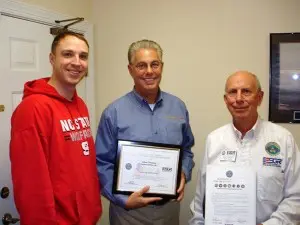
    RALEIGH, N.C. – North Carolina Employer Support of the Guard and Reserve, a Department of Defense program, announced Adam Pittman, the owner of Computerbilities, Inc. of Raleigh, was honored Dec. 15 with the Patriot Award for his support of Sgt. Justin Rowley, 492nd Signal Company, U.S. Army Reserve. The ceremony was hosted by ESGR volunteer, Griff Bartlett.

    “This is a small company, but Adam always went out of his way to make adjustments for my service,” said Rowley.  “I know it was difficult for the business but he made it work and I really appreciate it.”

    The Patriot Award recognizes individual managers nominated by an employee serving in the National Guard or Reserve for support provided directly to the nominating Service Member. The Patriot Award reflects the efforts made to support Citizen Warriors through a wide-range of measures including flexible schedules, time off prior to and after deployment, caring for families and granting leaves of absence of needed.

    During the presentation Adam Pittman said “I appreciate what Justin and all our Service members do and just try to help by doing what I can.”   Pittman also signed a Statement of Support during the ceremony.

    The Statement of Support Program is the cornerstone of ESGR’s effort to gain and maintain employer support for the Guard and Reserve. The intent of the program is to increase employer support by encouraging employers to act as advocates for employee participation in the military. Supportive employers are critical to maintaining the strength and readiness of the Nation’s Guard and Reserve units.

    “Organizations like Computerbilities, Inc. recognize the extraordinary value Guard and Reserve employees bring to the workplace,” said North Carolina ESGR Committee Chair Ron Bogle. “Hiring National Guard and Reserve members is not just the right thing to do; it is the smart business thing to do.”

    Employer Support of the Guard and Reserve was established in 1972 to develop and maintain employer support for Guard and Reserve service. ESGR advocates relevant initiatives, recognizes outstanding support, increases awareness of applicable laws, and resolves conflict between service members and employers. Paramount to ESGR’s mission is encouraging employment of Guardsmen and Reservists who bring integrity, global perspective and proven leadership to the civilian workforce.

    More information regarding ESGR Outreach Programs, or ESGR volunteer opportunities, is available at www.ESGR.mil or by calling Darrell Johnson at 984-664-6902 or email Luther.D.Johnson.ctr@mail.mil. Also, you can follow the North Carolina ESGR Committee on Twitter @NC_ESGR or Facebook at www.facebook.com/ESGRNC.

    Pictured left to right; Sgt. Justin Rowley, US Army Reserve, Adam Pittman, Computerbilities, Inc. and Griff Bartlett, ESGR

    Source: http://www.esgr.mil/News-Events/ESGR-In-The-News/articleType/ArticleView/articleId/6553.aspx